Comparison
The LiveChat alternative
that does the answering itself.
Outlearn is an AI support agent that reads the documentation your company already keeps and answers customers from it. It re-reads twenty systems every 30 minutes, answers with the sources attached, and leaves your team the judgment calls. You pay them per person. You pay us per reply.
LiveChat does live chat. Its AI agent is ChatBot.com, sold on its own per-seat bill, the second bill most LiveChat alternative comparisons never add up. Their meter doesn't charge when the AI fails, and the exclusion list is published. Ours bills every reply, misses included. On the meter, they beat us, and we'd rather you read it here first.
Updated
- Reads the originals
- 20 systems, re-read every 30 minutes
- No seat charge
- Hiring doesn't raise the bill
- Where they beat us, plainly
- They don't bill a failed answer
Confluence, SharePoint, Drive, OneDrive, Box, Dropbox, GitHub and five helpdesk knowledge bases. The originals, not a copy somebody keeps in sync.
Both their products price per person. Outlearn charges for the work it does and nothing for headcount.
Their exclusion list is published and specific. We bill the misses too. Their allowance is the ceiling: ten resolutions a month on Essential, 200 on Growth, then $0.99 each.
Outlearn is an AI support agent you connect to the systems your team already uses, twenty of them, and it goes back over every one of them every 30 minutes. Customers ask in web chat or email, your own people ask in Slack, and the same agent answers from the same knowledge. When a conversation needs judgment, it goes to your team in the helpdesk you already run, transcript included.
LiveChat is a full live-chat platform: widget, campaigns, visitor tracking and a staffed agent workspace. The AI agent is ChatBot.com, a sibling product from the same company, sold and billed separately. If the live-chat suite is what you're buying, buy LiveChat; that's the job it was built for.
They price two products per seat and don't bill a failed resolution. Outlearn prices nothing per seat and bills every reply. Which is cheaper depends almost entirely on how many people you employ, which tells you what each product thinks the unit of support is. Start every LiveChat alternative comparison there.
Short answer
The live-chat suite is theirs. Campaigns, visitor tracking, a staffed agent workspace: that's LiveChat's core, and Outlearn does none of it.
Shortlist a LiveChat alternative when the agent should be the product, not an add-on to it. It reads twenty systems where they already are, then checks them again every 30 minutes so the answers don't drift. It tailors the reply to the person asking, calls your APIs when the question turns out to be a job, and routes the hard stuff to a human with the full thread. Pricing stays flat, even as the team grows.
- 20
- Systems Outlearn reads in place
- 50.4%
- Solved by Outlearn automatically
- 4 min
- Signup to first answer
- 8
- Helpdesks it escalates into
Outlearn vs LiveChat at a glance
| Capability | ||
|---|---|---|
| What the AI reads, and who sees it | ||
| Third-party knowledge systems the AI reads | 20 | not published |
| Knowledge re-read on a schedule | every 30 minutes | not published |
| Answers scoped to each end user’s permissions | on your knowledge base | not published |
| What it costs | ||
| Subscriptions needed to run chat with AI | 1 | 2 |
| Cost per agent seat | $0 | $19 to $79, on each product |
| Charged when the AI fails to resolve | yes, every reply | No |
| AI resolutions included | 4,500 credits on Growth | 10 a month on Essential |
| Users on the entry plan | unlimited | 1 |
| Conversation history on the entry plan | unlimited | 60 days |
| Cost per resolved conversation | $0.20 | $2.07 |
| Which job each one is built for | ||
| Campaigns, visitor tracking, agent workspace | No | Yes |
| Customer-facing AI answering from your knowledge | included | ChatBot.com, sold separately |
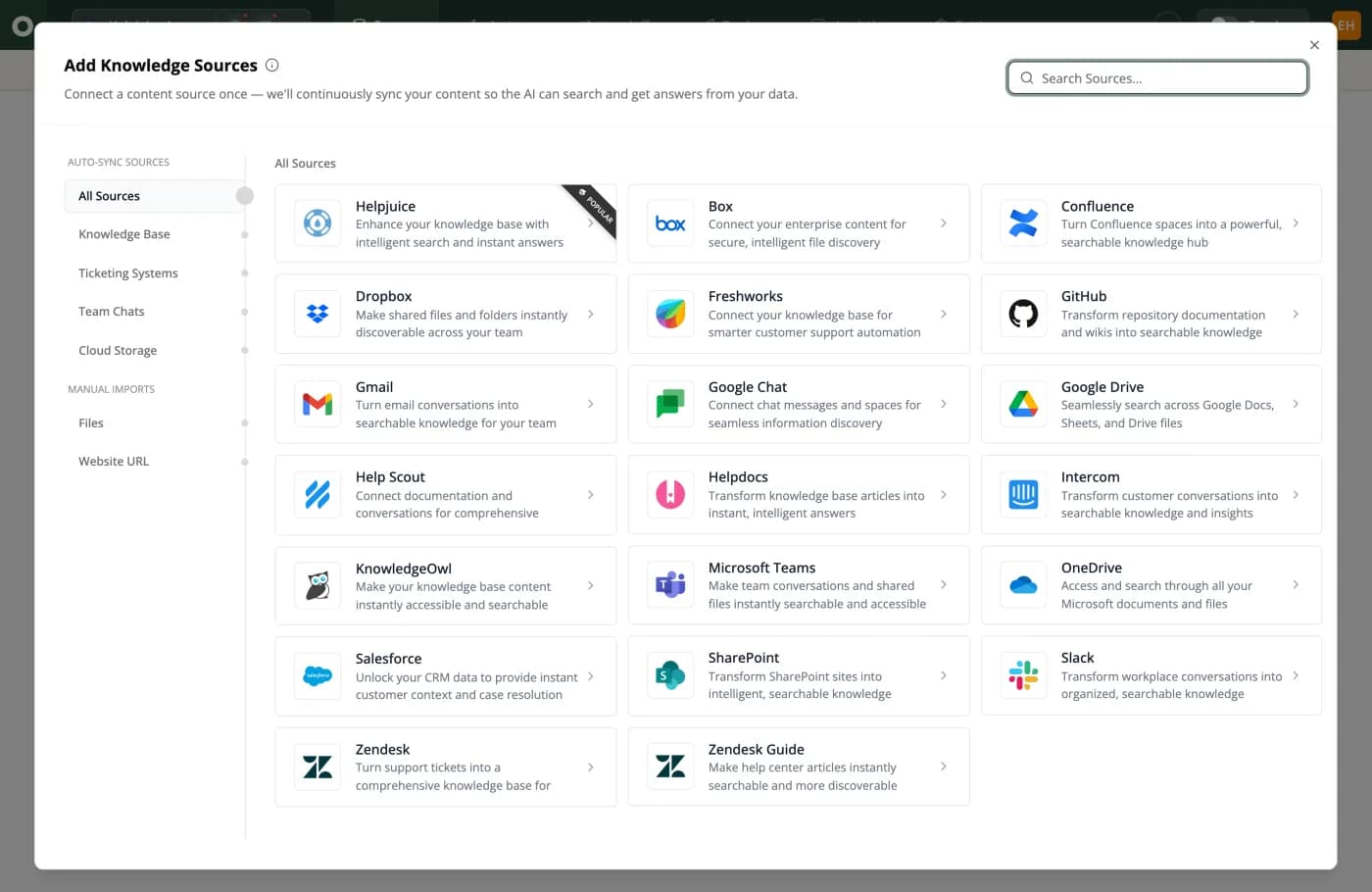
This is Outlearn's add-sources screen, where you connect what your team already runs instead of copying content into a bot. Manual Imports is two items, Files and Website URL, and most products in this category are entirely that bottom group. Confluence, SharePoint, Google Drive, Box, Dropbox and OneDrive all sit under Auto-Sync Sources, so the agent keeps up without a new internal process.
Where Outlearn and LiveChat actually differ
01
What support looks like once Outlearn runs first response
Buy it and the queue changes owners: Outlearn solves 50.4% of conversations automatically, and the ones that need a human still get one. That's the whole shift.
It plugs into twenty systems your company already runs and re-reads them every 30 minutes; after that you don't have to do anything. Every answer shows what it read.
Your customers and your own people don't ask in one place. The agent answers in web chat, email, Slack, Microsoft Teams and Google Chat: same agent, same knowledge, same actions. A large share of your support load is internal and never reaches a widget, because employees ask in Slack. In the per-seat world that's a second tool with a second index and a second thing to keep true.
When the answer is really a task, Outlearn calls your own API without leaving the chat: an order status, a subscription state, a refund. And when it should be a person, it hands the conversation into one of eight helpdesks, Zendesk, Intercom, LiveChat and Slack included, with the full transcript, and the billing on that conversation ends at the handoff. One bill covers all of it.
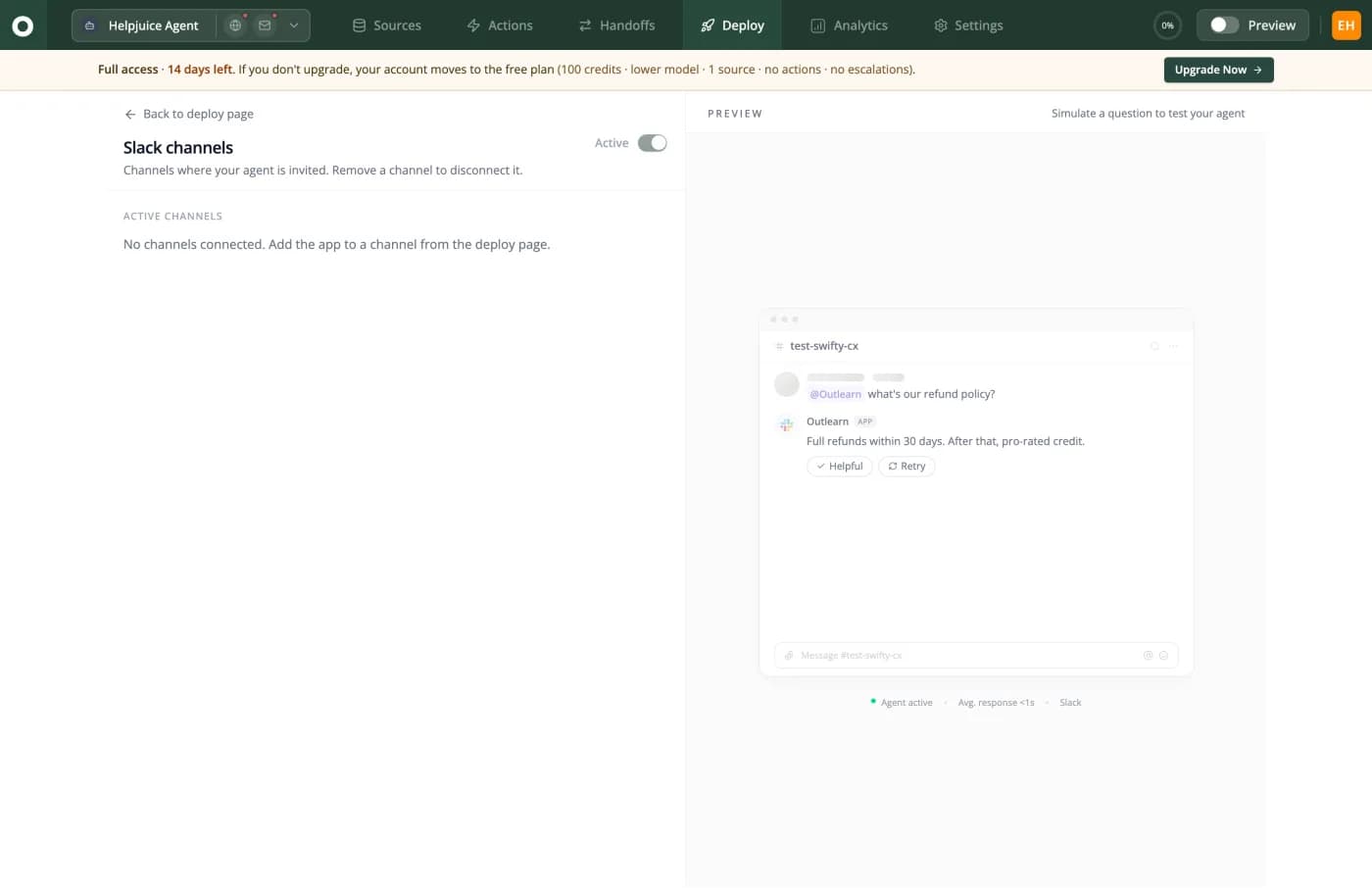
This is the same agent inside Slack. Someone asks "what's our refund policy?" in a channel and gets the answer from the same sources that serve your customers, in under a second. Those internal Slack pings are support work that seat-based accounting never sees. The Helpful and Retry buttons under the reply are how the answer gets better.
02
Their meter doesn't bill a miss. Ours does.
This section belongs to their meter, because it treats a failed answer differently than ours does, and you should know that before either bill changes.
ChatBot only counts a resolution when the AI actually resolved something. The exclusions are published, not implied: no charge when no issue is solved, none when the answer is irrelevant or incomplete, none when the chat transfers to a human with zero questions answered.
Most AI meters bill the attempt, helped or not; one bills a resolved conversation on two meters at once, another bills the first reply whether or not it did any good. We bill every reply, including the ones that miss. Ask every LiveChat alternative how its meter treats a miss; you just read our answer.
Two caveats travel with the compliment, both in the same fine print. Read the transfer clause literally: it excludes a transfer with zero questions answered, so one answered question plus a handoff is still billed. And who decides an answer was irrelevant or incomplete isn't published. Neither caveat undoes the design.
The counterweight is volume. Essential includes ten resolutions a month. Ten. Growth includes 200, per their pricing. After that it's $49.50 per fifty, which is $0.99 each, and $0.99 a unit is still $0.99 a unit: a thousand resolutions is $792 in packs on top of two seat bills. A two-person team doing 150 a month is better off with them, and the calculator below will say so. If ManyChat is on your shortlist as well, we compare it in the ManyChat write-up.
03
Two subscriptions is what AI looks like when it arrives late
The inbox came first and was priced per person, because a person read every conversation. That was correct. The AI arrived later as a sibling product, and it was priced per person too.
Their own FAQ spells the structure out: you pay for the chatbot, and separately you pay per agent for live chat. The same FAQ quotes a per-agent figure that doesn't match their own plan table, so get a current quote first. Any LiveChat alternative math has to start from both subscriptions.
Headcount hits you twice. Ten people on LiveChat Team is $490 a month. The same ten on ChatBot Growth is another $790. That's $1,280 before a single extra resolution is bought.
And the resolution pool doesn't grow with the seats. Essential at three seats is $57 a month and still ten resolutions total, because the allowance is per account, not per user.
Both numbers are a function of how many humans you hired, which is the exact assumption an agent is supposed to break. You pay them per person. You pay us per reply.
04
One product, and the knowledge isn't something you feed it
Twenty systems, read where they already sit: Confluence, SharePoint, Google Drive, OneDrive, Box, Dropbox, GitHub, Gmail, Slack, Microsoft Teams, Salesforce and five helpdesk knowledge bases. Not copies of them. The originals, re-read every thirty minutes.
So the agent catches up on its own. Somebody rewrites the returns page or retires an old plan, and the next answers use it. Nobody exports anything, nobody re-uploads anything, nobody files a ticket.
That's the line between a chatbot and an agent. A chatbot is a copy of your help center with a text box in front of it. An agent reads the systems the work actually happens in. That's the question a LiveChat alternative shortlist turns on, and neither pricing page is organized around it.
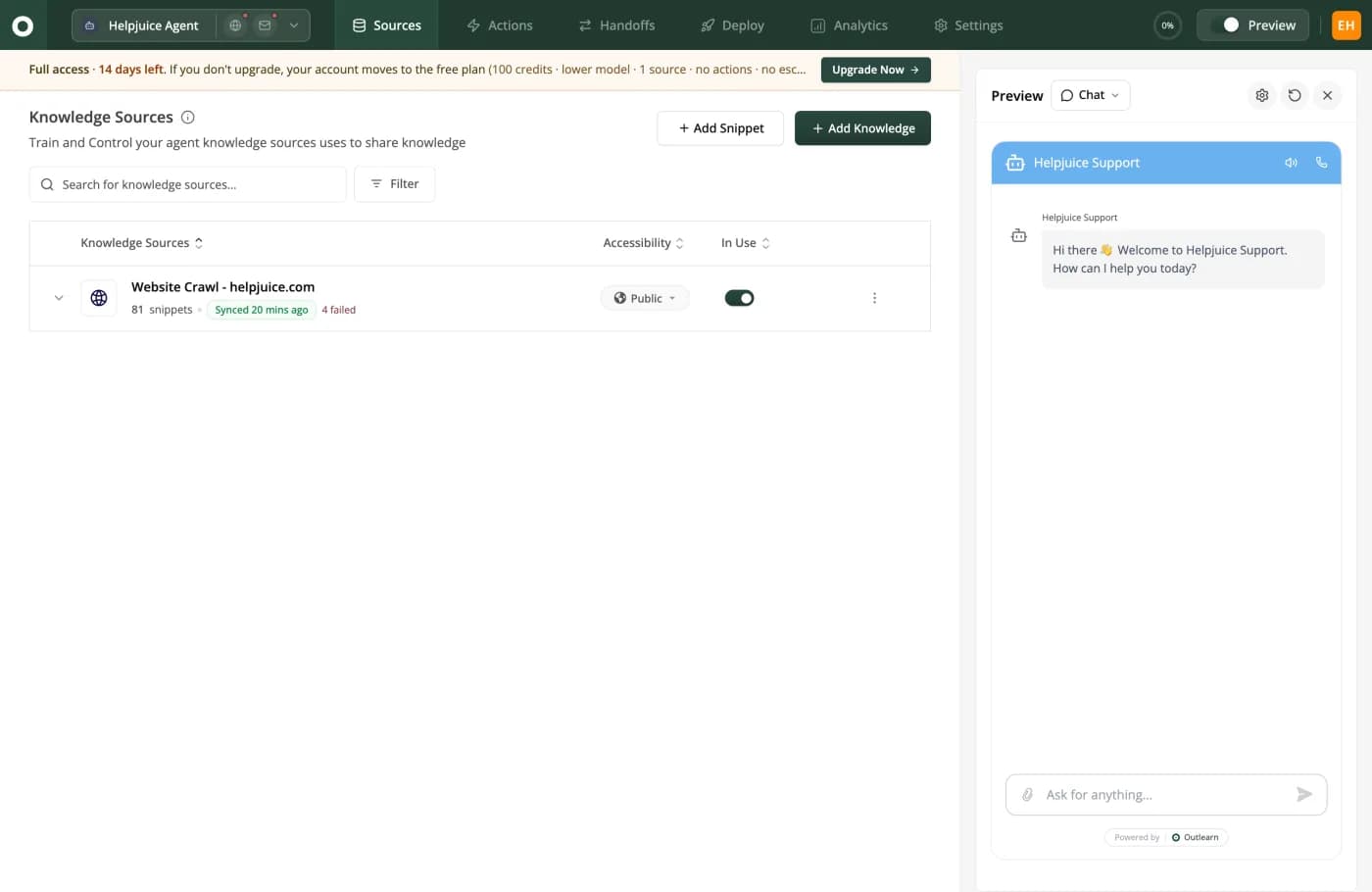
This is Outlearn's sources dashboard, and it's the whole upkeep job: one screen that says what got read, when, and what didn't. 81 snippets from a website crawl, synced 20 minutes ago, 4 failed shown in red instead of swept under the rug. Nobody staffs this screen, and a source that half-imports says so, which beats quietly answering from whatever happened to make it in.
05
It shows its sources, and it knows who's asking
A prospect on your pricing page, a paying customer and one of your own support leads shouldn't get the same answer. With Outlearn each gets the right one: the public docs, their plan's articles, the internal runbook.
That split is what makes internal sources safe to connect in the first place, and nobody has to police what the bot was told.
The limit, before you find it yourself: this works when the source can tell Outlearn who's allowed to see what, and today that's the knowledge base; a file pulled from Drive or SharePoint reads the same for everyone.
LiveChat and ChatBot don't publish a way to give different askers different answers. So teams keep internal docs out entirely, and the agent tops out at what you'd tell a stranger. And every Outlearn answer names the articles it came from, right under the reply, so you can check its work the way you'd check a new hire's.
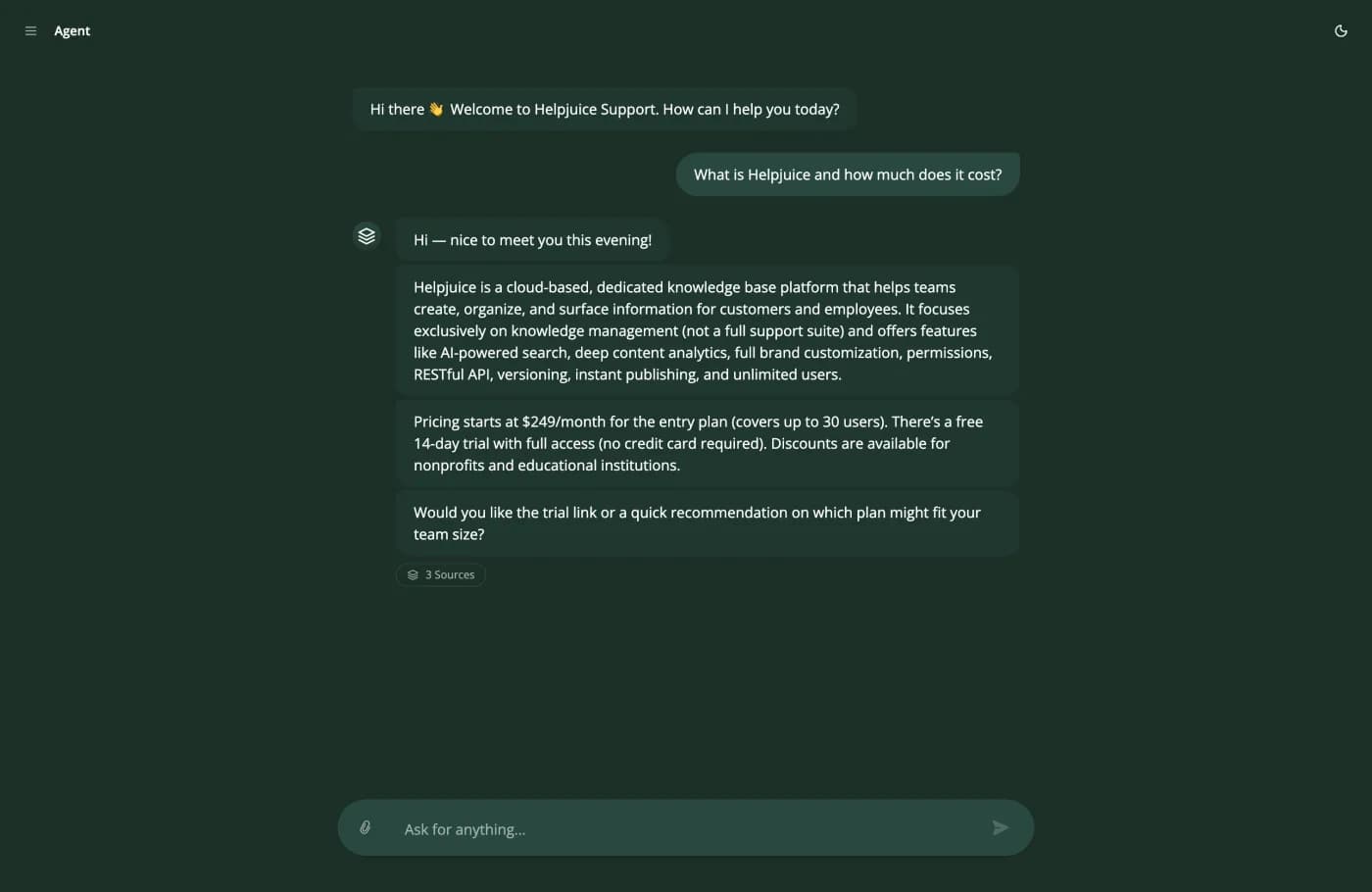
This is the agent answering a live pricing question in web chat: what the product does, the real price, $249 a month with a free 14-day trial, then a question back, the way a person keeps a conversation moving. Under the reply sits a 3 Sources chip that opens the exact articles behind it. It's answering, not retrieving.
06
What can their AI read?
ChatBot is explicit about being self-contained. Their own pricing page says: "ChatBot.com is a standalone AI. It doesn't rely on third-party providers like OpenAI, Google Bard, or Bing AI. It operates using its own technology stack." That's their stated engineering position.
It also means the knowledge has to come to the tool. No third-party document repository appears in their published sources. As everywhere on these pages, that's an absence in their documentation, not a confirmed limitation. But that single sentence decides whether you need a LiveChat alternative at all: if your answers sit in Confluence, Drive or SharePoint, somebody has to carry them over, and keep carrying them.
Worth separating out: LiveChat's in-product Copilot is an assistant for your agents, trained on LiveChat's own product documentation. It helps your team use LiveChat. It's not a customer-facing agent answering from your knowledge, and comparison pages conflate the two constantly.
What two subscriptions and 1,000 resolutions cost
Their bill is two per-seat subscriptions plus resolution packs. Ours is one usage line with no seats in it. Headcount decides which one is cheaper, so put your real numbers in before you believe any LiveChat alternative math, ours included.
| Line | LiveChat + ChatBot | |
|---|---|---|
| Inbox seats | n/a, no seat charge | 10 x $49 = $490 |
| AI agent seats | n/a | 10 x $79 = $790 |
| AI resolutions included | 4,500 credits | 200 |
| Extra resolutions needed | none | 800, at $49.50 per 50 |
| Resolution packs | $0 | $792 |
| Charged when the AI misses | Yes | No |
| Total per month | $199 | $2,072 |
How we calculated this
LiveChat is shown on Team and ChatBot on Growth, both at annual billing, because Starter allows exactly one user. The 800 extra resolutions are billed in 50-packs at $49.50, their published top-up rate. Their meter excludes failed answers, so at a lower resolution rate their AI line falls while ours doesn't, and the comparison narrows. Outlearn is shown on Growth at four AI replies per resolution at one credit each, which is our assumption rather than measured data. And whatever LiveChat alternative you end up pricing, price it against the sum of both subscriptions, not one.
LiveChat pricing verified 7 August 2026 against their own pricing page.
Cost calculator
Credits, tickets and resolutions are not the same unit, which is why comparing these two means building a spreadsheet. Put your numbers in instead.
Outlearn
Growth · 4,000 credits
$199/mo
$0.20 per resolution
LiveChat
Team + ChatBot Growth · 10 seats on both products, 1,000 resolutions
$2,072/mo
$2.07 per resolution
That is $1,873 less than LiveChat a month, because LiveChat is two products on two bills. The inbox is per seat and the AI agent is a separate ChatBot.com subscription on top, with its own per-seat charge and its own resolution packs.
Outlearn bills one credit per AI reply, so your 1,000 resolutions at 4 replies each is 4,000 credits. LiveChat bills per seat. Billed annually; the AI agent is a separate ChatBot.com subscription. LiveChat prices checked 7 August 2026, ours 7 August 2026.
LiveChat reviews, and which number to trust
LiveChat has a long review trail, which helps when you're weighing a LiveChat alternative. We couldn't reach G2 or Capterra from here, so those cells sit empty instead of holding numbers we never read.
| Product | G2 | Capterra | Trustpilot |
|---|---|---|---|
| OutlearnNew product. No third-party listing yet. | No listing | No listing | No listing |
| HelpjuiceOur parent company, in business since 2011 | No listing | 4.7104 reviews | No listing |
| LiveChatAlso 4.6 from 1,727 on Software Advice and 6.9/10 on TrustRadius | No listing | No listing | 2.896 reviews |
How we picked these
The 2.8 from 96 on Trustpilot against 4.6 from 1,727 on Software Advice is the usual pattern: small unprompted samples skew negative, and the Software Advice sample is eighteen times the size. We used the livechatinc.com Trustpilot profile; the obvious livechat.com listing is near-empty at 2.1 from 10, and quoting it would've been misleading.
How to replace the second subscription, not the widget
- 1
Point it at your real documentation
Connect Confluence, SharePoint, Drive, OneDrive, Box, Dropbox, GitHub and your helpdesk knowledge base. Outlearn reads them in place and re-reads them every 30 minutes. The trial is 14 days, no card.
- 2
Keep the widget
The chat experience, the campaigns and the visitor tracking are the part your customers and your sales team touch. Shopping for a LiveChat alternative here usually means replacing ChatBot.com, not your live-chat workflow.
- 3
Count your seats on both products
The second per-seat bill is the one people forget, and the sum is the number a LiveChat alternative has to beat. Add them together before you compare anything.
- 4
Watch what happens past 200 resolutions
That's where ChatBot Growth's allowance ends and the $0.99 packs begin. Below that line their meter costs you nothing when the AI misses, and ours doesn't. Past it, the case for a LiveChat alternative starts writing itself.
Frequently asked questions
What is the best LiveChat alternative in 2026?
Split it by job.
If you're buying the live-chat suite, campaigns and visitor tracking included, that job is LiveChat's and Outlearn isn't a replacement for it. If you're buying the AI agent, Outlearn is the direct answer: one product with no seat charge, twenty knowledge systems read live and re-read every thirty minutes, answers matched to the person asking, and a handoff that carries the whole transcript. Don't pick a LiveChat alternative hoping it grows campaigns; that half stays LiveChat's.
Does LiveChat charge when its AI fails?
No.
[ChatBot publishes an exclusion list](https://www.text.com/help/ai-agent-resolutions-and-automatic-refill/): no charge when no issue is solved, when the answer is irrelevant or incomplete, or when the chat transfers to a human with zero questions answered. That last clause is literal: one answered question plus a handoff is still billed. Outlearn bills every AI reply, the misses too. If you never want to pay when the answer fails, that's a real reason to stay.
How much does LiveChat cost with AI?
Two subscriptions.
The inbox is per person: $19 Starter, $49 Team and $79 Business billed annually, or $25, $59 and $89 billed monthly, and Starter allows exactly one user. ChatBot.com is per user billed yearly: $19 Essential with 10 AI resolutions a month, $79 Growth with 200. Extra resolutions come in 50-packs at $49.50, which is $0.99 each. Their own FAQ also quotes a per-agent figure that doesn't match their plan table, so get a current quote.
Is ChatBot.com the same company as LiveChat?
Yes.
Both are Text, Inc., and chatbot.com and text.com serve the same product and the same price table. They're sold and billed as separate subscriptions even though they come from one company, which is worth knowing when you compare their price against any one-product LiveChat alternative.
Can LiveChat's AI read Confluence or Google Drive?
Neither appears in ChatBot's published sources, and they describe the product as a standalone AI running on its own technology stack rather than third-party providers.
We won't claim it's impossible, only undocumented. And don't confuse it with LiveChat's Copilot, an internal assistant trained on LiveChat's own product docs to help your agents use LiveChat, not a customer-facing agent answering from your knowledge.
Is Outlearn cheaper than LiveChat?
At ten agents and a thousand resolutions, by a lot: roughly $199 against $2,072, and most of that gap is two per-seat bills rather than the AI.
At two agents and 150 resolutions it reverses, because their allowance covers you and their meter doesn't bill failures while ours does. That's why the calculator is on this page: a LiveChat alternative should win or lose on your headcount and your volume, and it'll tell you to stay if that's the answer.
Can I keep LiveChat and still use Outlearn?
Yes, and for most teams that's the right first step.
LiveChat keeps the widget, the campaigns and the visitor tracking, and your agents keep the inbox they know. Outlearn answers from your connected systems first and escalates into LiveChat with the whole transcript. Both products ship analytics and a public API, so nothing in your reporting or your tooling breaks. What a LiveChat alternative actually replaces here is the second ChatBot.com subscription, not LiveChat itself.
Connect your docs, cut the second bill
Point Outlearn at the documentation ChatBot was never shown, then throw it the "where's this policy" and "how do I change plans" repeats your team is sick of answering. That's the real test of any LiveChat alternative, and it runs before either bill changes. The widget stays; nothing gets ripped out. Free tier, no card.
Sources checked 7 August 2026: Outlearn pricing.
Switching from something else?
Switch from Freshdesk
A mature, cheap helpdesk priced per agent, with SSO on its entry plan. Outlearn charges nothing per seat.
Switch from Zendesk
A fair AI meter, exports switched off until you ask, and a bill that counts agents. Outlearn reads your Guide in place.
Switch from ManyChat
ManyChat bills every person you can reach, because Instagram marketing is the job. Outlearn bills the answers it writes.
See every tool
Every platform we have compared Outlearn against, side by side.