Comparison
The Zendesk alternative
you can try without exporting anything.
Zendesk is the default. They have been at this since 2007, they hold 4.4 out of 5 from 4,089 reviews on Software Advice, and their AI customer service agents ship on every plan rather than as an upsell. This is not a page telling you Zendesk is bad software.
It is priced around agents. Suite Team is $55 an agent a month on annual billing, so a ten-person team is $6,600 a year before a single automated resolution.
Two things worth knowing. First, their AI rate depends on a commitment you may not have made: $1.50 per automated resolution if you committed to volume, $2.00 if you did not. Second, and this is the one that bites: their own documentation says "data exports are not enabled by default in Zendesk accounts", that "the account owner must contact Zendesk Customer Support to enable data exports", and that the export tools are "not available on Team plans" at all.
So the normal way to evaluate a Zendesk alternative runs into a wall: you cannot get your own knowledge out without filing a ticket first. Outlearn does not ask you to. It reads your Guide articles and your tickets in place, over Zendesk's own API, every 30 minutes.
Updated
- The meter
- Counts the work, not the agents
- Reads your Guide in place
- No export required to try it
- Their meter doesn't bill a miss
- They do not bill an escalation. We do.
- The honest limit
- No inbox
Suite Team is $55 an agent a month. Outlearn charges for AI work and nothing for headcount, so hiring a rep does not change the bill.
Outlearn reads Zendesk Guide and your tickets and re-reads them every 30 minutes. You never have to file a ticket to get your own data out first.
Zendesk bills only resolutions the AI closed without a human, LLM-verified. Ours bills every reply.
Outlearn is not a helpdesk. Zendesk is.
Outlearn is an AI support agent that plugs into the systems your company already runs. It reads your documentation where it lives, answers in chat, email and Slack, looks up an order, and hands the hard ones to a person with the whole conversation attached.
Zendesk is the category's incumbent helpdesk. Ticketing, omnichannel routing, messaging, telephony, Guide for your help centre, and AI agents on every plan billed on the resolutions they produce.
Zendesk charges for agents and meters the AI on outcomes. Outlearn charges for AI work and nothing for agents. That is a disagreement about how many people need to read a ticket.
- $0
- What Outlearn charges per agent seat
- 30 min
- How often Outlearn re-reads your Guide
- $6,600
- Zendesk Suite Team, ten agents, per year, before any AI
- $1.50
- Per automated resolution committed, or $2.00 pay-as-you-go
Outlearn vs Zendesk at a glance
| Capability | ||
|---|---|---|
| What it costs | ||
| Cost per agent seat | $0 | $19 to $115 per agent/mo |
| Charged when the AI fails to resolve | yes, every reply | No |
| AI billing unit | one AI reply | one automated resolution |
| Rate per AI unit | $0.0399 per credit | $1.50 committed, $2.00 without |
| Cost per resolved conversation | $0.20 | $2.03 |
| What each one is, and is not | ||
| Shared inbox and ticketing | No | Yes |
| Bulk data export through the interface | No | off by default, and not on Team |
| What the AI reads, and who sees it | ||
| Third-party knowledge systems the AI reads | 20 | 13 |
| Reads your Zendesk Guide and tickets directly | yes, both | n/a, they are theirs |
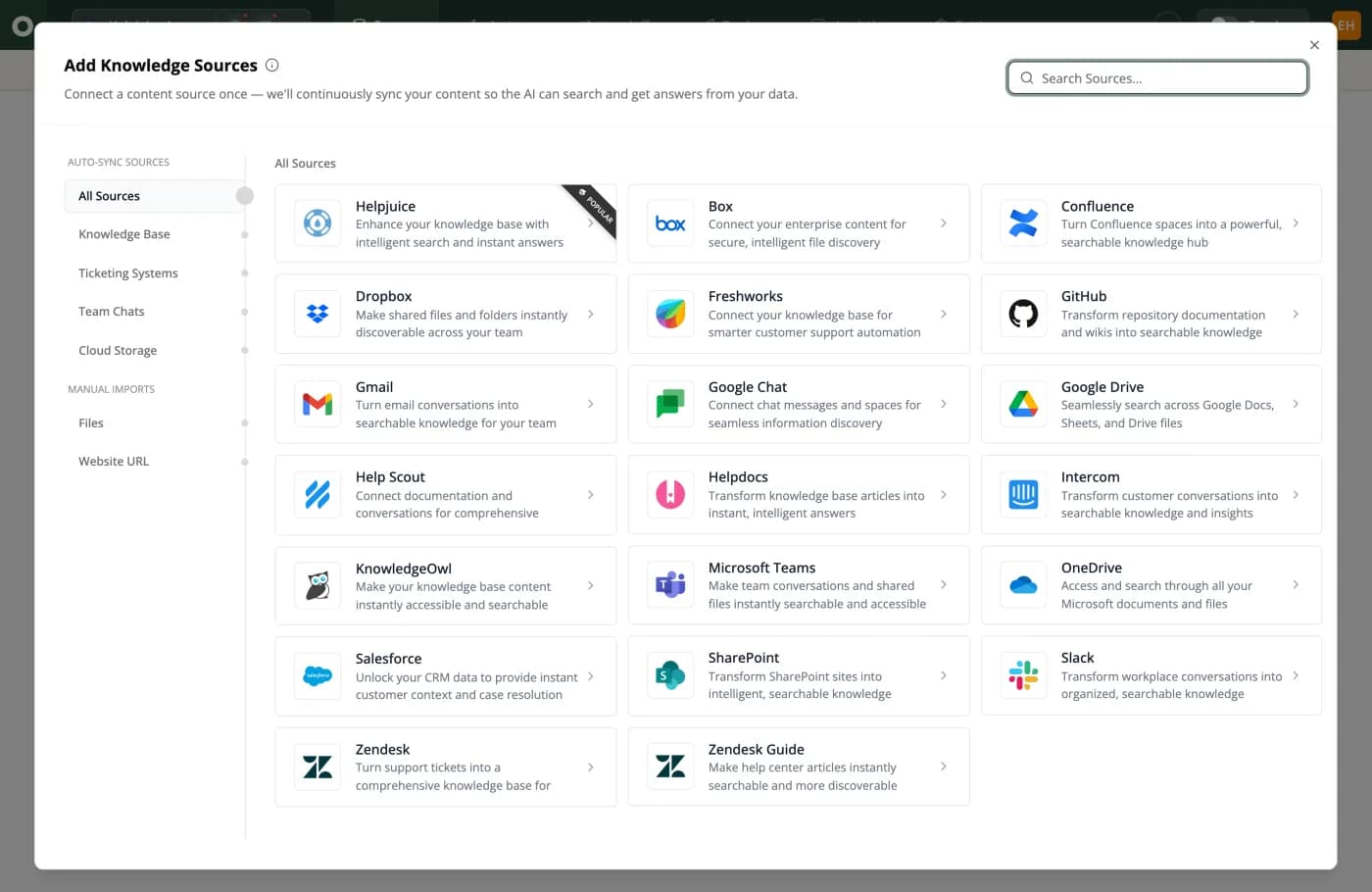
The last two tiles are Zendesk and Zendesk Guide: tickets and help centre articles, both under Auto-Sync Sources.
Where Outlearn and Zendesk actually differ
01
A helpdesk is priced around the people who read the tickets
That is the assumption underneath every helpdesk ever built, Zendesk included. Somebody had to read each message, so the fair thing to charge for was somebody.
Zendesk is the full build-out of that product. Guide, routing, telephony, an 1,800-app marketplace, a security posture that clears procurement, and AI agents on every plan rather than as an upsell. What changed is that an agent can now read your live systems, work out who is asking, call your API and answer, the original, every thirty minutes, not a copy of your help centre. Most of the volume then never becomes a ticket.
So $55 an agent is not expensive so much as aimed at a different question. Be fair to it though: at three agents on Support Team, Zendesk is $57 a month and Outlearn is not the cheap option.
Their prices are published, and the add-ons are where it grows. Four of the five plans they show carry one, and Copilot, Workforce Engagement and Contact Center each add $50 to $83 an agent a month on top.
02
You can try Outlearn without getting your data out first
This one is in our code, not on a roadmap.
Outlearn reads your Zendesk Guide articles over Zendesk's own API, and a separate connector reads your tickets. Both are re-read every 30 minutes, and your help centre stays exactly where it is.
Evaluating a Zendesk alternative normally means exporting your knowledge and uploading it somewhere, and export is the exact thing Zendesk makes hard. Outlearn needs none of it. The Zendesk AI chatbot use case walks through this exact setup, keeping Zendesk and putting an AI agent in front of it.
One honest limit: auto-sync every 30 minutes is a paid feature and is off on the free tier.
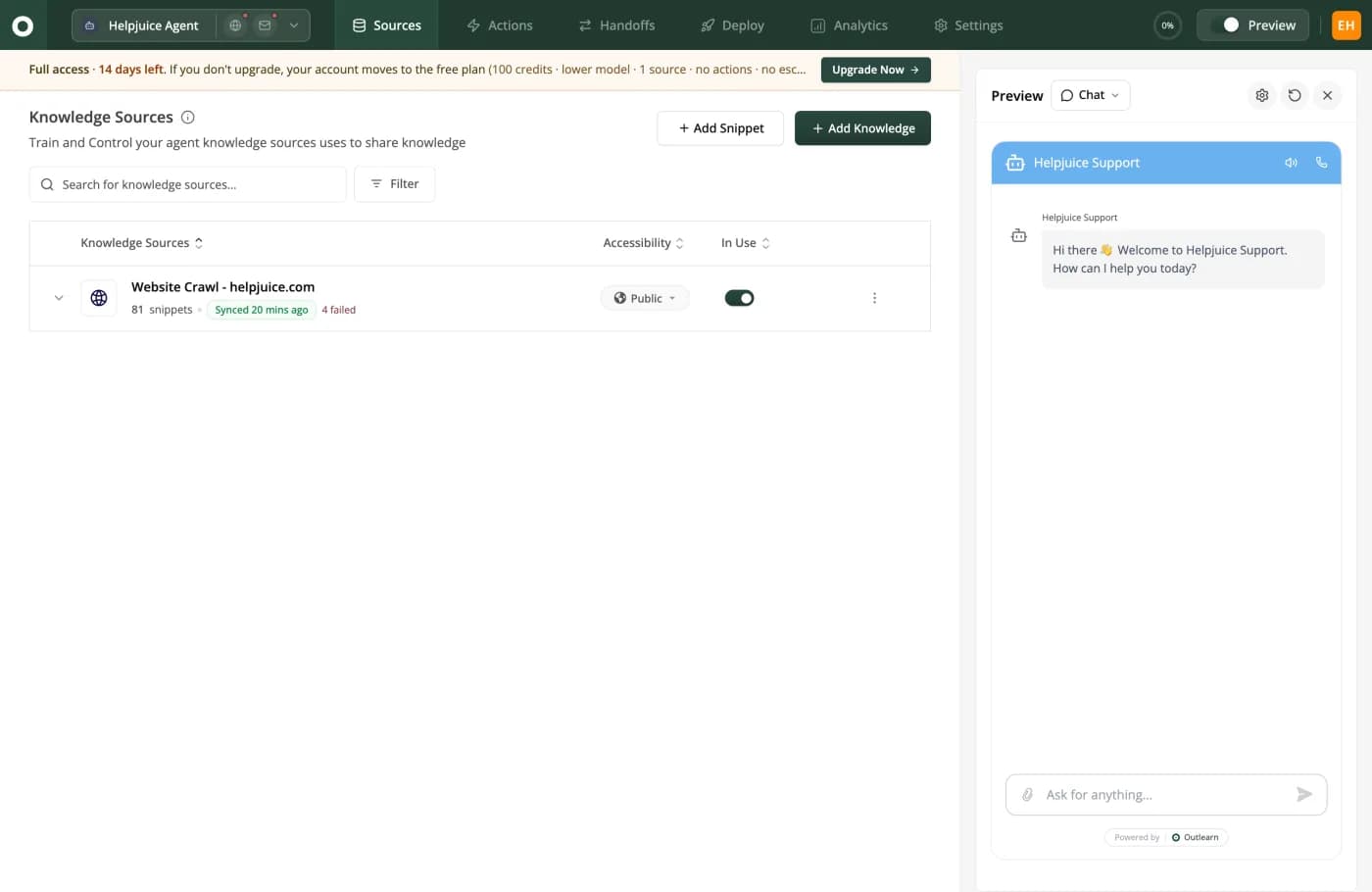
Synced 20 mins ago, and to its right 4 failed in red. A source that quietly stopped reading is worse than one that never ran.
03
Their meter doesn't bill a miss. Ours does.
This section argues against our own meter, out loud.
Zendesk bills an automated resolution, and their definition excludes failure. Verbatim: "you pay only for customer requests that were successfully resolved by the AI agent, without any escalation to a human agent." And: "Only conversations that were not escalated are evaluated for automated resolutions." They verify it too: "Conversations flagged as resolved are also verified by a large language model (LLM)."
Outlearn bills every AI reply, including the one that missed, and the fourth reply in a conversation that ends with a human anyway.
The allowance is a currency pool, not a count. Since 18 May 2026: $2 per agent per month on Team, $5 on Growth and Professional, $10 on Enterprise, capped at $5,000 a year. Past the pool you either allow overage or the AI pauses.
There are two rates and most comparison pages print one. Their own blog states the committed one verbatim, "Zendesk charges $1.50 per automated resolution", on a page modified 29 June 2026, so it is live and not stale. Without a commitment you pay $2.00, and the table below models $1.50, so read our Zendesk column as roughly a third low.
Their resolution tiers cut the other way. Since 18 May 2026 Zendesk sorts each AI conversation into three: a Verified resolution, an Assisted escalation where the AI contributed and a person finished, and a Contained resolution where the customer simply stopped asking. Their own doc carries the identical sentence under two of the three: "This tier does not count against your resolution allowance." Only a Verified resolution bills. So the table below, which bills 1,000 of 1,000, is a ceiling rather than a forecast, and their real bill is lower by whatever share of your conversations lands in the other two tiers. Nobody knows that share until you run it. Their tiers article is badged for the Suite plans only.
So the question is not the headline rate. It is "does this meter charge me when the bot fails?" Ours does. The Intercom write-up asks the same question of Fin's meter.
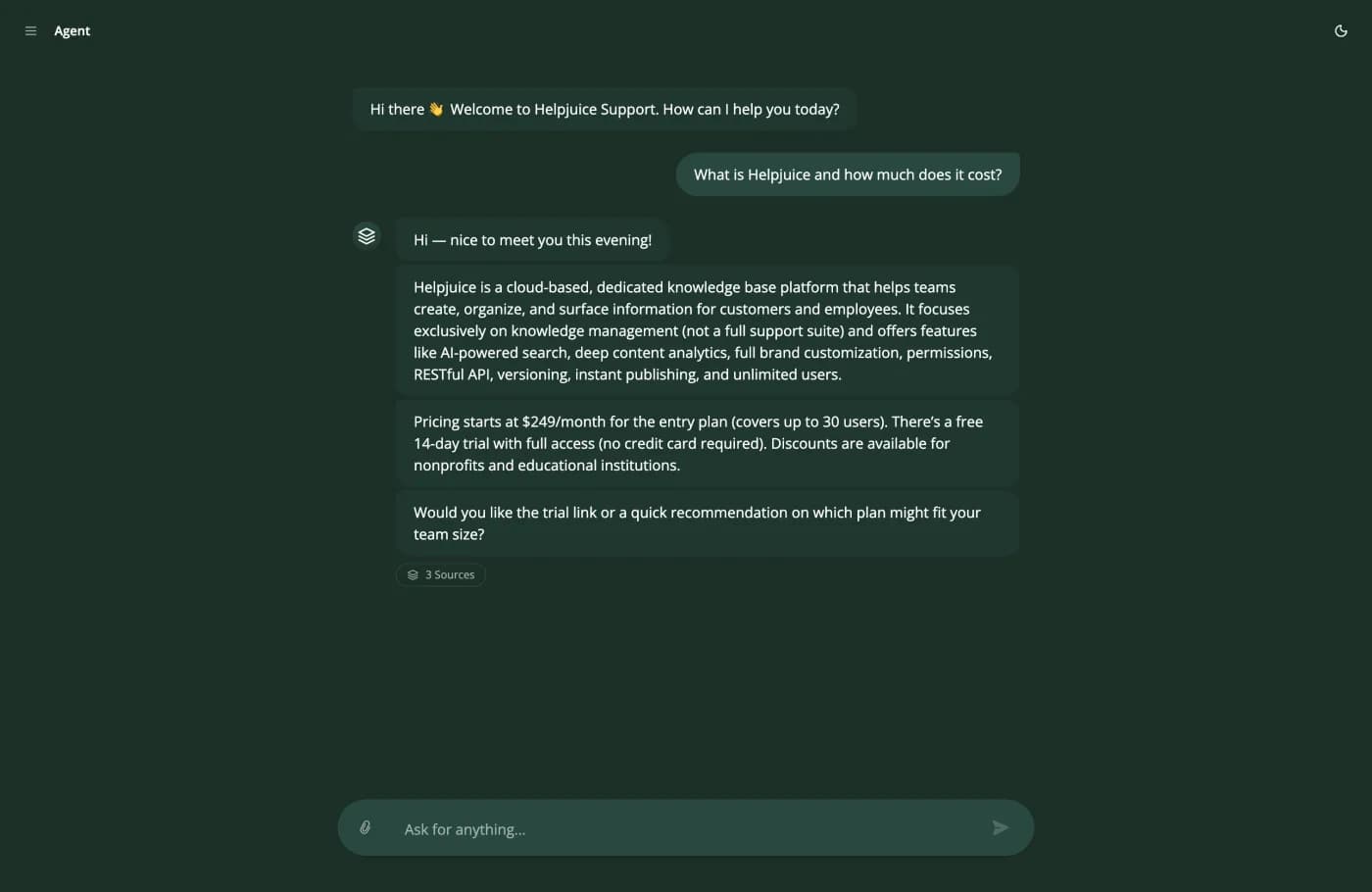
A 3 Sources chip under a pricing answer that quotes a real number.
04
What Outlearn does instead, and what it cannot do
It answers with the receipt attached. A 3 Sources chip under each answer, so anyone can open the articles it read. Pass a signed token and retrieval scopes to whoever is asking: public docs for a visitor, their plan's articles for a customer, internal runbooks for an employee. The limit you will find in week two: scoping works on your knowledge base, not on cloud-file connectors, which do not import users. It also runs HTTP actions against your own endpoints.
Now the gaps. Outlearn is not a helpdesk: no inbox, no queue, no routing, no telephony. No sandbox, no custom roles, no 1,800-app marketplace. And their AI reads the same third-party systems ours does, Confluence, SharePoint, Drive and Notion included, so if somebody told you Zendesk's AI can only read Zendesk, that was wrong.
What ten agents and 1,000 AI resolutions cost
Zendesk's bill is agents plus automated resolutions, minus an allowance that does not roll over. Outlearn's is credits, no headcount. Put your real numbers in the calculator below.
| Line | Zendesk Suite Team | |
|---|---|---|
| Agent seats billed | None | 10 |
| Seat cost per month | $0 | $550 |
| AI plan or meter | Growth, $199 | $1.50 per automated resolution |
| Monthly resolution allowance | included in Growth | $20, and it does not roll over |
| AI cost at 1,000 resolutions | included in Growth | $1,480 |
| Total per month | $199 | $2,030 |
| Charged for a failed AI answer | Yes, every reply | No |
| Export your own data | Nothing to export, we read in place | Off by default, unavailable on Team |
How we calculated this
Zendesk is shown on Suite Team at $55 per agent annual, because it is the cheapest plan carrying AI agents AND Guide, the help centre Outlearn reads. It is not their cheapest plan with AI: Support Team at $19 carries AI agents and five included automated resolutions per agent per month, so a team that does not need Guide starts lower, and at three agents Support Team is $57 a month against our $199. The AI line uses their $1.50 committed rate, published on their pricing page and stated verbatim on their blog; their pay-as-you-go rate is $2.00, so without a volume commitment this column is about a third low. It is a ceiling in the other direction: since 18 May 2026 only a Verified resolution bills, while an assisted escalation and a contained resolution each carry their doc's line 'This tier does not count against your resolution allowance', and this table bills all 1,000. The $20 allowance is their published $2 per agent per month on Team, which does not carry over. Every Zendesk figure here is annual; their published monthly prices are $25, $69, $115, $149 and $219. Outlearn is shown on Growth at four AI responses per resolution on a 1-credit model, which is our assumption rather than measured data, so treat our column as a floor.
Zendesk pricing verified 11 September 2026 against their own pricing page.
Cost calculator
Credits, tickets and resolutions are not the same unit, which is why comparing these two means building a spreadsheet. Put your numbers in instead.
Outlearn
Growth · 4,000 credits
$199/mo
$0.20 per resolution
Zendesk
Suite Team x 10 seats · 10 seats + 1,000 automated resolutions
$2,030/mo
$2.03 per resolution
That is $1,831 less than Zendesk a month, and nearly all of the gap is the seat line. Suite Team is $55 an agent before a single automated resolution, and Outlearn charges nothing for headcount.
Outlearn bills one credit per AI reply, so your 1,000 resolutions at 4 replies each is 4,000 credits. Zendesk bills per automated resolution. Annual billing at their $1.50 committed rate; pay-as-you-go is $2.00, and only a Verified resolution bills, so this is a ceiling for Zendesk rather than a forecast. Zendesk prices checked 11 September 2026, ours 7 August 2026.
Zendesk's 1.8 on Trustpilot is not what it looks like
Zendesk's Trustpilot score is 1.8 from 729, and it does not measure what it appears to. Read the note under their row before using that number anywhere.
| Product | G2 | Capterra | Trustpilot |
|---|---|---|---|
| OutlearnNew product. No third-party listing yet. | No listing | No listing | No listing |
| HelpjuiceOur parent company, in business since 2011 | No listing | 4.7104 reviews | No listing |
| Zendesk4.4 from 4,089 on Software Advice, where actual buyers review. Their Trustpilot page is mostly end customers of companies that run Zendesk. G2 and Capterra unreachable. | No listing | No listing | 1.8729 reviews |
“I received poor support, faced bugs, and my account manager left Zendesk with no introduction to the new person who will take over. When trying to reach out to the support I had to fight with an AI bot who was happy to help me with my request to churn the contract.”
“The user interface is beautiful and it works well, but I'm so mad that they made two factor auth required daily. This should be up to the companies.”
“Zendesk has proven to be a solid platform for our customer support needs. The system is straightforward to use and has helped to streamline our support channels into a single workspace. The automation features are effective. Zendesk is a standard for our operations.”
How we picked these
That 1.8 cuts both ways. We read 103 of the one-stars. Most are not from Zendesk customers at all: end consumers who bought a pair of sandals or a sat nav from a retailer that happens to run Zendesk, complaining about the retailer. But roughly a third of them are real Zendesk customers, complaining about exactly what this page is about: an automated-resolutions charge in the thousands that the customer says he never switched on, and getting data back out. On Software Advice, where the reviewer bought the product, Zendesk holds 4.4 from 4,089. Quote the 1.8 alone and you are selling something; explain it away and you throw out the third that argues our case.
How to try Outlearn without leaving Zendesk
- 1
Connect Guide, do not export it
Point Outlearn at Zendesk Guide and at your tickets. It pulls both over Zendesk's own API every 30 minutes, so you never ask Zendesk to switch exports on.
- 2
Add the systems your help centre does not cover
Confluence, SharePoint, Google Drive, OneDrive, Box, Dropbox, GitHub, Slack and Teams. Zendesk's AI reads several of these too, so this is a coverage check rather than a gap.
- 3
Turn on per-customer answers
Pass a signed token and answers get scoped to the customer asking. Do this before judging quality, because an unscoped agent answers everyone alike.
- 4
Compare on your own traffic, then count billing events
Keep Zendesk answering, point Outlearn at the same questions, and read the auto-solve rate. Then count billing events: Zendesk bills only resolutions it closed, we bill every reply.
Frequently asked questions
What is the best Zendesk alternative in 2026?
It depends which half of Zendesk you are replacing.
For the desk itself, meaning inbox, queue, routing and telephony, Outlearn is not that; compare other helpdesks. For an AI layer over the documentation and tickets you already have, with no per-agent bill, Outlearn is that: twenty systems read live, re-read every 30 minutes.
Does Zendesk charge you when its AI fails?
No.
Their documentation says you pay only for requests successfully resolved by the AI agent without escalation to a human, that only non-escalated conversations are even evaluated, and that a resolution is LLM-verified before it counts. Outlearn bills every AI reply, misses included. Check the allowance: a currency pool of $2 to $10 per agent per month, capped at $5,000 a year, which their own doc says does not carry over.
Can Outlearn read my Zendesk help centre?
Yes, directly over Zendesk's own API.
The Zendesk Guide connector pulls your help centre articles; a separate Zendesk connector pulls your support tickets. Both re-read every 30 minutes. Zendesk's own documentation turns data exports off by default and withholds the export tools from Team plans entirely. One limit: auto-sync is a paid feature, off on the free tier.
Connect Guide and see the difference in an afternoon
Keep Zendesk running. Point Outlearn at your Guide articles and your tickets, add the systems they do not cover, and compare on your own questions. No export to request, no card.
Sources checked 11 September 2026: About automated resolutions for AI agents · Managing resolution allowances · Connecting external knowledge sources · Exporting ticket, user or organization data · Enabling SAML single sign-on · Zendesk reviews on Software Advice · Outlearn pricing.
Switching from something else?
Switch from Freshdesk
A mature, cheap helpdesk priced per agent, with SSO on its entry plan. Outlearn charges nothing per seat.
Switch from ManyChat
ManyChat bills every person you can reach, because Instagram marketing is the job. Outlearn bills the answers it writes.
Switch from Chatbase
Both take real actions. Only Outlearn reads Confluence, SharePoint and Drive, and scopes each answer to what that customer may see.
See every tool
Every platform we have compared Outlearn against, side by side.