Guide
How to automate customer service
without wrecking it.
Automated customer service (customer service automation) is support work a machine finishes without a person touching it. Whether that is a good idea depends on three things nobody selling it leads with: which of your question shapes have one written answer, what one resolved conversation costs on the meter you sign, and what happens the moment the machine gives up.
This guide covers all three, with the arithmetic shown. 10 vendors normalised to cost per resolved conversation from their own published prices. The five failure modes that end deployments, each with a test you can run inside a trial. And the honest list of situations where you should not automate at all.
We sell one of these products, so read accordingly. Every competitor number below comes from that competitor's own public page with the date we read it, and the places our own product loses are marked as losses rather than left out.
Updated
18 minute readWhat automated customer service actually is
Automated customer service is any support work a machine finishes without a person touching it. Routing the ticket. Tagging it. Answering the question. Looking up the order. Closing the loop. That is the entire definition, and it arrives several hundred words earlier here than on the pages currently ranking for the term.
The category used to mean macros and keyword scripts. In 2026 it mostly means a retrieval agent that reads your documentation and systems, writes an answer grounded in what it found, and takes actions mid-conversation. The name stayed. The machinery did not, and two products both sold as automated customer service now fail in completely different ways.
The four layers of customer service automation, from safest to riskiest
Automation is a surface rather than a product, and the layers do not carry the same risk. The order below is the order to deploy them in, because it is the order of what a failure costs.
| Layer | What it does | What a failure looks like | When to deploy it |
|---|---|---|---|
| 1. Triage and routing | Sorts, tags and assigns incoming tickets. A person still answers every one. | A ticket lands in the wrong queue, and a person moves it back in seconds. | First. The customer never sees it work or fail. |
| 2. Drafting for your team | Writes a suggested reply that a human edits and sends. | A bad draft that a person deletes before anybody sees it. | Second. The human is the guardrail. |
| 3. Answering | Resolves a question from your documentation with no person involved. | A wrong answer delivered with confidence, at scale. | After the twenty answers exist and escalation works. |
| 4. Acting | Looks up or changes something in your systems mid-conversation. | Real money moved on a misread sentence. | Last, in blast-radius order, with caps on anything that writes. |
What this guide does, and what it deliberately does not do
The ten pages ranking for this term, measured 14 August 2026, are all vendor blogs, and none of them publishes an original number: no first-party resolution rate, no costed comparison, no arithmetic a reader can re-run. This guide does the other thing.
- It says what to automate first and what never to automate, by question shape, with the reason for each.
- It publishes the arithmetic: ten vendors normalised to cost per resolved conversation, computed from their own published prices at three volumes.
- It names the five failure modes the page-one results do not mention, each with a test you can run inside a trial.
- It says when not to automate at all, including the volume below which a person is simply better.
- It does not rank us first, and where a competitor is genuinely cheaper or better designed, the table says so in the cell.
Two disclosures before you read further, because they change how you should read the rest. Outlearn sells customer service automation, so we have an interest. And every number about a competitor here comes from that competitor's own public page, with the date we read it recorded at the foot of the page, so you can check us rather than trust us. For the answering layer vendor by vendor, our customer service chatbot guide goes deeper, and the conversational AI for customer service guide covers the technology stage by stage.
Customer service automation examples
The category is easier to see as a list of jobs than as a definition. Every row below is a piece of support work that software finishes today, in the layer it belongs to, with the part a person still does. The rows are ordered the way the four layers are: the ones where a mistake is invisible first, the ones where a mistake moves money last.
| Example | Layer | What the automation does | What the human still does |
|---|---|---|---|
| Ticket routing and tagging | 1. Triage | Reads the incoming ticket, tags the topic and sends it to the right queue. | Answers it. Moves the rare mis-routed one back. |
| Priority and sentiment flags | 1. Triage | Marks the angry, the urgent and the at-risk account before anyone opens the queue. | Decides who takes those first. |
| Drafted replies inside the helpdesk | 2. Drafting | Writes a suggested answer from your documentation next to the ticket, in Zendesk or Intercom. | Edits and sends it. The human is the guardrail. |
| Answers on the website widget | 3. Answering | Resolves the documented questions on the site, 24/7, with the source article shown. | Takes the conversation the moment the customer asks for a person. |
| Email replies from the support inbox | 3. Answering | Reads the forwarded email, searches the sources, drafts and sends the reply. | Handles anything that matched a handoff trigger. |
| Internal answers in Slack or Microsoft Teams | 3. Answering | Answers the team's own questions from internal documentation, in the thread. | Fixes the article when the answer was wrong. |
| Order status and account lookups | 4. Actions | Checks the order, the subscription or the invoice mid-conversation and replies with the result. | Owns the exceptions: the lost parcel, the disputed charge. |
| Refunds, address changes, cancellations | 4. Actions | Runs the action against your own endpoint when the trigger and the policy match. | Sets the policy, the limits and the cases that always escalate. |
Two things the list makes obvious. The first three examples never reach the customer without a person in between, which is why a rollout starts there. The last two move money, which is why they come last and why the actions page is mostly about limits. If your queue is under thirty conversations a week, the honest answer is that none of the eight pays back yet; the when not to automate section below is for you.
Help desk automation: what to automate first, and what never should be
The useful question is not whether to automate customer service. It is which question shapes to hand over and which to keep, and the answer is decided by question shape rather than by channel. Help desk automation is the same decision made inside the ticketing tool: the routing, tagging and status lookups go first, the judgement calls stay with a person. Some rows below earn automation on day one. Some should never get it, and the distance between those two groups is the difference between a deployment that survives and one that gets switched off in month three.
| Question or task | Automate? | Why | The control or the alternative |
|---|---|---|---|
| Ticket routing, tagging and prioritisation | Yes, on day one | Invisible to the customer and trivially reversible. | Spot-check a sample weekly until the error rate gets boring. |
| "How do I reset my password" | Yes, ideal | High volume, one correct answer, written down, no judgement required. | Nothing. This is the case the category was built for. |
| "Where is my order" | Yes, with an action | The answer is in your database, not your documentation. | A read-only order lookup, wired before launch. |
| "You charged me twice and I am furious" | No | The content is a refund and the substance is anger. A correct machine answer reads as a brush-off. | Detect the sentiment, skip the reply, route to a person with the transcript. |
| "Can I get an exception to your policy" | No | There is no documented answer, because the answer is a judgement somebody is accountable for. | Escalate immediately. Never let the machine guess at a commitment. |
| Refunds and cancellations performed by the machine | Capped only | Real money moves on a misread sentence. | A hard value cap and a review queue, not a confidence score. |
| Changing an email or resetting a password for the customer | No | The blast radius is an account takeover assisted by your own automation. | Keep it out of scope entirely. Answer the how-to, never perform the change. |
| Anything legal, medical or safety-critical | No | A wrong answer is not a bad experience. It is liability, and it is irreversible. | A person, every time, by design rather than by guardrail. |
| Questions your documentation answers twice, differently | No, actively harmful | The machine will confidently pick one of the two contradictions, and you will not know which. | Fix the contradiction first. This is the most common preventable failure. |
| Under roughly thirty conversations a week | Probably not | A person replying in ten minutes is better, and the setup work will not pay back. | Write a good FAQ page and revisit when volume triples. |
Automate the resolution, not the deflection
“Most tools are designed to deflect vs resolve. You want something that can take action. If your bot can't look up a database or change a subscription it's just a fancy search bar. We won't use anything that can't process a refund by itself.”
That is the sharpest buying advice in the category, and it is two sentences long. Automation that only deflects moves the queue. Automation that resolves shrinks it, and resolving is what requires reading your systems. A deflected customer who emails back five minutes later was not served. They were postponed.
The full version of that argument, with the five metrics that get gamed and what to report instead, is in the customer service chatbot guide. The short version: report resolution paired with a seven-day repeat-contact rate, because the pair cannot be gamed by hiding the contact button.
What automated customer service costs, in one comparable unit
This is the section that does not exist anywhere else on this SERP. We read the ten pages ranking for automated customer service on 14 August 2026: Salesforce, IBM and Zendesk hold the top three, and not one of the ten publishes an original number. No resolution rate from their own deployment. No costed comparison. No arithmetic a buyer can re-run. So here is the arithmetic.
Why the published prices cannot be compared
No two vendors in this category sell the same unit. One charges per seat, one per resolution, one per ticket whether anything was resolved or not, one per credit that varies with the model you pick, and one charges two meters for a single conversation. Putting the headline numbers side by side is not a comparison. It is several different questions answered next to each other.
So we did the conversion instead: the same thousand resolved conversations, costed against every vendor's own published pricing page, in one unit.
| Vendor | Cost per resolved conversation | Monthly total | What the meter counts | Plan this lands on |
|---|---|---|---|---|
| Chatbase | $0.12 | $120 | Per AI response | Standard. 4,000 credits. |
| Outlearn | $0.20 | $199 | Per AI response | Growth. 4,000 credits. |
| Zoho Desk | $0.23 | $230 | Per seat | Professional x 10 seats. Billed annually; AI metered in LLM tokens, not resolutions. |
| Front | $0.35 | $350 | Per seat | Starter x 10 seats. Annual commit; no monthly price published. |
| Help Scout | $1.00 | $1,000 | Per seat | Standard x 10 seats. 10 seats + 1,000 AI resolutions. |
| Intercom Fin | $1.28 | $1,280 | Per Fin outcome | Essential x 10 seats + Fin. Billed annually; Fin is not billed when a conversation escalates to a human. |
| Tidio Lyro | $1.43 | $1,429 | Per Lyro conversation | Premium, sales-quoted. Above 1,000 Tidio publishes no price; shown at their $0.70 floor. |
| Gorgias | $1.69 | $1,686 | Per automated interaction | Pro + overage. Annual billing; AI Agent bundled into the card price. |
| Helply | $2.00 | $2,000 | Per ticket | $1 per ticket. Annual contract, $3,000/yr minimum. |
| LiveChat | $2.07 | $2,072 | Per seat | Team + ChatBot Growth. Billed annually; the AI agent is a separate ChatBot.com subscription. |
The spread is 17.3x for the same outcome, from $0.12 at Chatbase to $2.07 at LiveChat, and almost none of it is about answer quality. It is about which meter you signed. Outlearn is row 2 of 10 at $0.20, and Chatbase is cheaper than us.
How the ranking changes with volume
One volume is not enough, because the order is not stable. A seat-priced product looks expensive at 250 conversations and reasonable at 4,000, since the seats are already paid for. A per-unit meter looks cheap at 250 and never improves. Any automated customer service comparison quoted at a single volume has quietly chosen the volume that flattered somebody.
| Vendor | 250 resolved / mo | 1,000 resolved / mo | 4,000 resolved / mo | What moves the number |
|---|---|---|---|---|
| Chatbase | $0.48 | $0.12 | $0.11 | Falls 4.4x across the range, because the fixed part of the bill is already paid for by the time volume arrives. |
| Outlearn | $0.40 | $0.20 | $0.15 | Falls 2.6x across the range, because the fixed part of the bill is already paid for by the time volume arrives. |
| Zoho Desk | $0.92 | $0.23 | $0.06 | Falls 15.7x across the range, because the fixed part of the bill is already paid for by the time volume arrives. |
| Front | $1.10 | $0.35 | $0.16 | Falls 6.8x across the range, because the fixed part of the bill is already paid for by the time volume arrives. |
| Help Scout | $1.75 | $1.00 | $0.81 | Falls 2.2x across the range, because the fixed part of the bill is already paid for by the time volume arrives. |
| Intercom Fin | $2.15 | $1.28 | $1.06 | Falls 2.0x across the range, because the fixed part of the bill is already paid for by the time volume arrives. |
| Tidio Lyro | $1.52 | $1.43 | $1.41 | Flat within 8% across a sixteenfold volume increase. The meter is the bill, so growing does not help you. |
| Gorgias | $1.95 | $1.69 | $1.88 | Flat within 4% across a sixteenfold volume increase. The meter is the bill, so growing does not help you. |
| Helply | $2.00 | $2.00 | $2.00 | Flat within 0% across a sixteenfold volume increase. The meter is the bill, so growing does not help you. |
| LiveChat | $5.32 | $2.07 | $1.26 | Falls 4.2x across the range, because the fixed part of the bill is already paid for by the time volume arrives. |
The practical read: below roughly 500 resolved conversations a month, plan floors and seat minimums decide your bill and the meter barely matters. Above a few thousand, the meter is the only thing that matters, and a per-outcome rate compounds against you exactly as your automation improves.
How to re-run this on your own numbers
Take your monthly count of conversations you believe could be automated. Multiply by the resolution rate you actually expect, which should be around 50 percent rather than 85. That is your resolved-conversation count. Then, for each vendor, work out the total bill at that volume including seats, and divide by that count.
- Trap one. A per-resolution meter looks cheapest at low volume and gets worse as the automation improves, because a better agent resolves more.
- Trap two. A per-ticket meter charges you for conversations the machine did not resolve, so a low resolution rate makes it dramatically worse rather than cheaper.
- Trap three. A credit meter multiplies by the model you choose, and the cheap headline rate is almost never the model you would actually run.
- Trap four. Seat floors. One plan in the table bills a ten-seat minimum, so a five-person team pays for ten before anything is automated.
Every comparison page on this site carries an interactive version of this calculation with your own numbers in it. Compare the field side by side, or read our pricing for the plan and credit detail behind our own row. The best AI chatbot for customer service roundup scores the wider field on the two axes this table cannot show.
Assumptions, stated so you can disagree with them. Ten seats, because that is the seat floor the seat-priced vendors are shaped around. A 50% resolution rate, used to derive how many conversations must run through a per-ticket or per-conversation meter to yield 1,000 resolutions. Four AI replies per resolved conversation on the credit-metered vendors, which is our assumption and not anyone's data. Annual billing where a vendor's default is annual. Every price read from the vendor's own pricing page on 2026-08-07. Zendesk and Crisp have no row: Zendesk publishes a $1.50 committed rate but bills only Verified resolutions, so any row would be a ceiling rather than a forecast, and Crisp sells AI as workspace credit, so its per-resolution figure would rest on our conversion rather than a published unit. Both Outlearn and Chatbase charge more per reply for a more expensive model, which multiplies both of those rows by an amount neither of us publishes cleanly, so treat this table as a floor.
Five ways automated customer service breaks in production
Ranked by how often practitioners describe them in public. None of the five appears on a page-one result for this term, measured 14 August 2026, which is odd, because every one of them ends deployments. Each comes with a test you can run inside a trial.
1. It automates the contradiction
The most common preventable failure, and the least dramatic to describe. Two pages in your help centre give two different refund windows. A customer asks, and the machine answers with one of them, confidently, forever. Feeding it more content makes it worse rather than better, because contradictions do not average out. They compete, and retrieval picks a winner you did not choose.
One team described feeding three years of conversations and hundreds of documentation pages to an agent that still could not answer how to log in. They ended up deleting the lot and starting again. Test: search your own documentation for your refund window. Two different numbers is the whole problem, and no vendor fixes it for you.
2. The metric improves while the customer leaves
“execs loved our automation success rate, 40-something percent deflection, beautiful QBR slides. meanwhile i'm going through churn interviews and people are literally saying i tried to get help and just gave up. that's not deflection, that's abandonment dressed up in a metric.”
Deflection cannot distinguish a solved customer from one who gave up, and those two outcomes have opposite effects on your revenue. Test: ask for the repeat-contact rate on AI-closed conversations during the trial, not after the contract.
3. The loop with no exit
“I literally tried that exact phrase. Not once, but over and over. I want to talk to a human. I want to talk to an advisor. The bot either ignored it, sent me back to another AI.”
The most viscerally described failure in every public support forum, and the cheapest one to prevent. Test: make "I want to talk to a human" the first sentence you ever send your own system, and check that the handoff carries the full transcript so the person does not start from zero. Also check what your bill does at that moment, because several meters charge you for the failed conversation anyway.
4. It invents policy at machine speed
A machine that cannot find an answer has two options: admit it, or write one. The second is how a customer ends up being told they do not need to return an item to get a refund, which is a commitment your company may be held to. One public account describes a company's own chatbot spreading a false return policy to customers. It is linked in the sources rather than paraphrased.
Test: ask the trial agent about a policy your documentation does not cover. A well-built one says it cannot find that and offers a person. A poorly built one writes you a plausible policy.
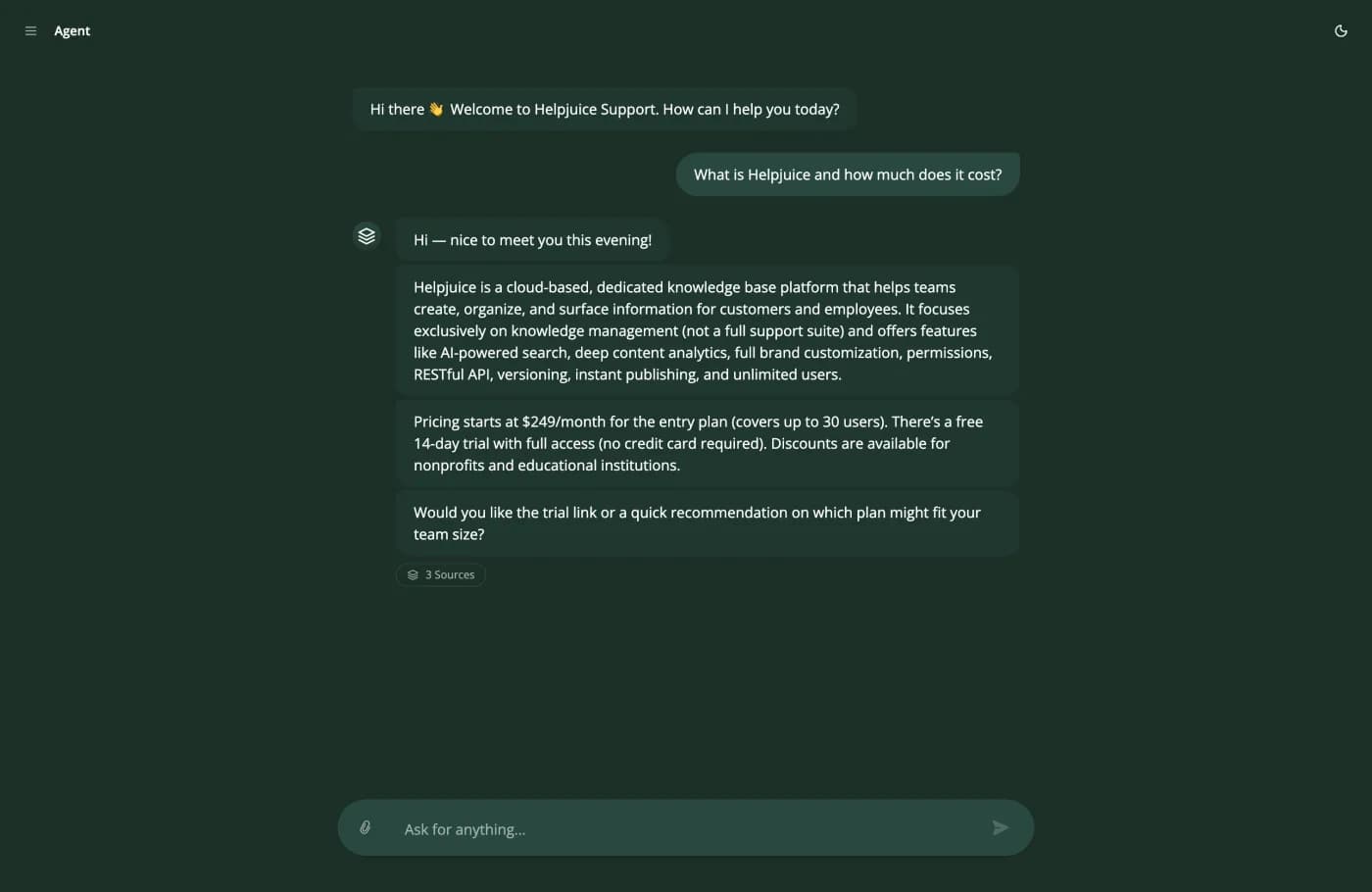
The 3 Sources chip is the antidote. Open it and you get the three articles this answer was written from, so a wrong answer can be traced back to the document that caused it. An automated answer that cannot show its working is a liability at exactly the moment you need to fix it.
5. The permission is the blast radius
“AI configured to resolve T1 tickets. Budget untouched. Good customer service. Pick two. And, if you picked the autonomous agent, gain a 100-sided Law of Large Numbers dice. Every day, roll the dice. On a 1, your autonomous agent breaks something. For every permission it has, roll again.”
The mitigation is to hold the number of dice down: read-only actions first, write actions after a fortnight of good behaviour, a hard cap on anything that moves money, and nothing touching account access. Test: ask for the full list of what the agent can call, and what is logged when it calls it. An unlogged automated write is an incident you cannot investigate, only apologise for.
All quotes above are from public threads, linked in the sources section. We have not paraphrased them into something more flattering, and at least one of them describes the category we sell into.
How to automate your customer service without wrecking it
The order matters more than the content of any single step. Two of these eight are routinely done last, and they are the reason projects fail: escalation, and the weekly review. Do them in the order written.
- 1
Week 1. Count the queue before you automate any of it
Pull last month's tickets and sort them into piles by question shape, not by channel. Most teams find that five shapes account for more than half of all volume, and that concentration is the whole case for customer service automation. You cannot automate what you have not counted, and the pile sizes decide everything that follows.
- 2
Week 1. Write the twenty answers down, or admit they do not exist
Take the twenty highest-volume question shapes and confirm each one has a single, current, findable answer. If two documents disagree about your refund window, automation does not resolve the disagreement. It picks one of the two and tells the customer with confidence, and you will never know which.
- 3
Week 2. Automate the invisible work first
Routing, tagging, prioritisation and follow-up reminders. A misrouted ticket costs a person ten seconds to fix. A wrong answer sent to a customer costs trust. Start where failure is cheap, because that is where you learn the tooling without teaching your customers to distrust you.
- 4
Week 2. Turn on escalation before you turn on answers
Wire the handoff into the inbox your team already works in, full transcript attached, and make "I want to talk to a human" the first sentence you ever type at your own system. If that does not work on the first attempt, nothing downstream of it matters.
- 5
Week 3. Replay last month against the machine
Take 100 real closed conversations, put each customer's opening message to the agent, and grade every reply as correct, incomplete or wrong. You now have an automation rate measured on your own traffic instead of a number from a vendor deck. If it lands between 40 and 60 percent, you are exactly where honest practitioners report landing.
- 6
Week 4. Answer in one channel and one segment
One channel, ideally the lowest-stakes one, and one audience. Logged-in customers on the billing page, or anonymous visitors on the docs site. Not everywhere at once, because the first week of real traffic will surface question shapes your backlog did not contain.
- 7
Weeks 5 to 8. Add actions in order of blast radius
Read-only first: order lookup, subscription status, licence check. Anything that writes, refunds, cancels or resets waits until the read-only ones have behaved for a fortnight, and it ships with a hard value cap rather than a confidence score. Password resets and account access stay with a person.
- 8
Weeks 9 to 12. Name an owner and start the weekly review
Thirty minutes a week reading the conversations the machine got wrong improves automated customer service more than any setting in any product. Almost every wrong answer is a missing document, a contradictory document, or a question that should always reach a person. An automation with no named owner degrades quietly, which is the worst way for software to fail.
What actually slows the project down
It is almost never the software. Practitioners are consistent about the four real brakes, and all four sit on your side of the line, which is good news: they are the parts you can start before you have chosen a vendor at all.
- Content cleanup, because somebody has to decide which of two contradictory refund policies is real, and that person is usually busy.
- Integration access, because a read-only API credential requires a ticket to a team that does not report to you.
- Permission decisions, because what the machine may do is a policy question rather than a configuration one.
- The security review, because it is scheduled rather than performed, and the queue is not yours.
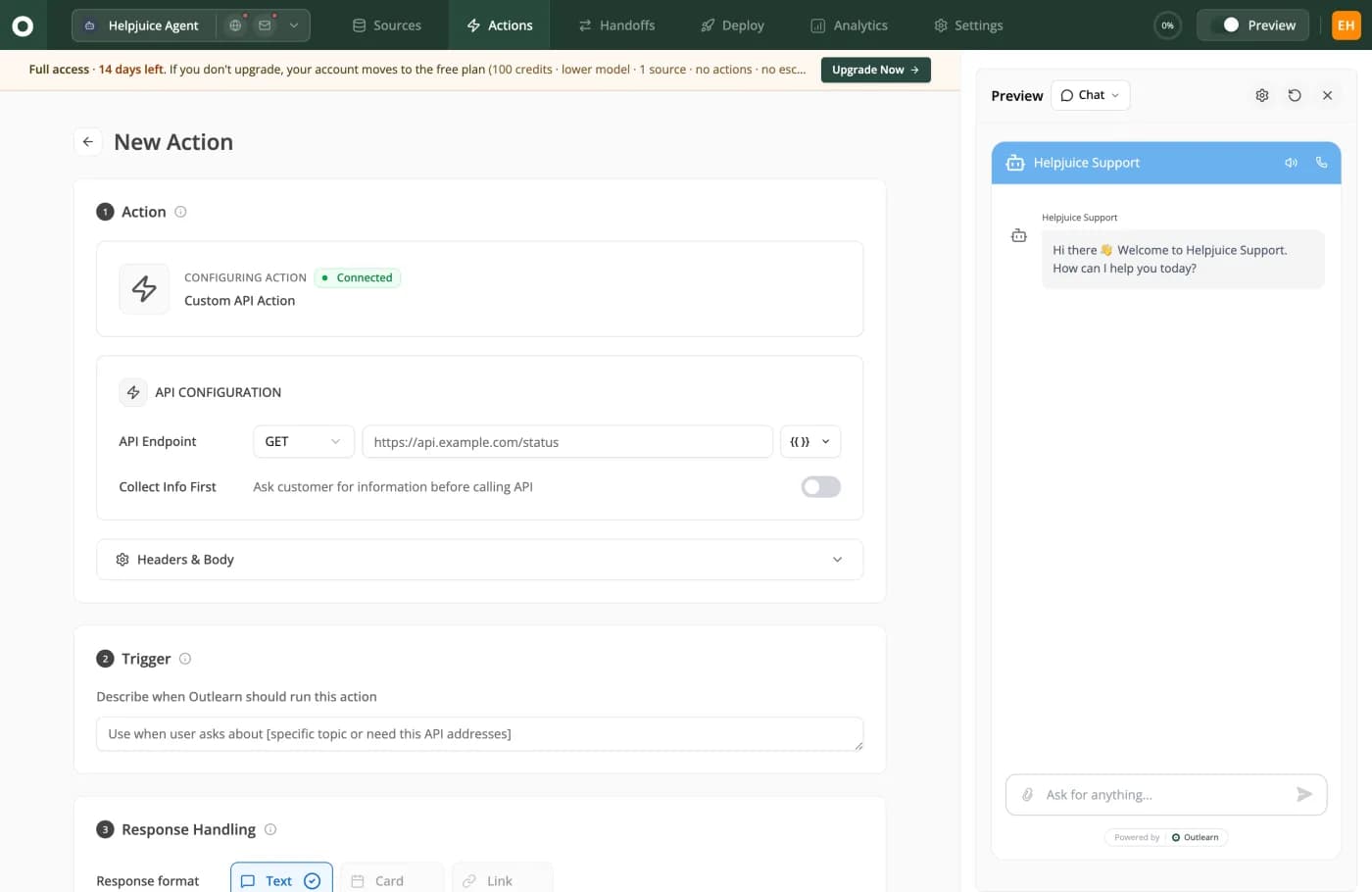
Weeks five to eight in one screen. Step 1 is your endpoint and your own auth headers. Step 2 is a sentence, not a rules tree: "Describe when Outlearn should run this action." The permission boundary lives in the credential you issue, so a read-only key cannot be prompted into a write.
When not to automate customer service
No page selling customer service automation carries this section, which is exactly why it belongs in this guide. There are situations where automation is worse than nothing, and knowing them before you launch saves you the version of this project that gets switched off in month three.
- Your volume is under roughly thirty conversations a week. The setup work is the same as for a large team and the payback is much smaller, and a person answering within ten minutes is a genuinely better experience than a good machine answer.
- The answer is not written down anywhere. Retrieval cannot retrieve what does not exist, so the machine answers from something adjacent and sounds right. Write the answer down first. Then it becomes the easiest row in the table.
- Your documentation contradicts itself. The machine will pick one of the contradictions with confidence, and you will never know which. Fix the documentation first, and if you cannot, do not deploy.
- The moment is emotional rather than informational. Anger is a routing signal, not a content problem. A correct answer delivered by a machine to a furious customer reads as a brush-off, and it costs you the customer.
- A wrong answer is expensive and irreversible. Legal, medical, safety-critical, or anything that moves money without a cap. If the mistake cannot be undone inside a day, it stays with a person regardless of how well the demo went.
- Nobody will read what the machine got wrong. A support queue is also a research instrument: every conversation is a signal about what customers are struggling with. Automating it without reading it throws away the most honest product feedback you own, and an unowned automated customer service deployment decays silently.
And one honest organisational point. If the internal pitch for automated customer service is that it lets you cut the team, expect the team to resist the project, and expect the number you report each month to become the target rather than the measure. The framing that survives is capacity: the same people handle the exceptions, the escalations and the proactive work they never had time for, and the queue stops being the ceiling on what support can do.
What to measure after you switch it on
One metric will be gamed, whether or not anybody means to. A pair of metrics with opposing failure modes will not. Report both from week one, so nobody has to renegotiate the definition in month three, when the first number looks good.
| Period | The number your board wants | The guardrail number | What a bad pair looks like |
|---|---|---|---|
| Days 1 to 30 | Resolution rate on the launch segment only. | Escalation success: what share of "talk to a human" requests worked first time. | A high resolution rate and any escalation failures at all. Fix the second before celebrating the first. |
| Days 31 to 60 | Resolution rate across all live channels. | Repeat-contact rate within seven days on AI-closed conversations. | Resolution up and repeat contact up together. That is abandonment, not success. |
| Days 61 to 90 | Cost per resolved conversation, computed from your real invoice. | Satisfaction on AI-closed conversations, reported separately from human-closed. | Cost per resolution rising as volume rises. That is the meter, not the agent. |
| Every month after | Share of total contacts the machine handled end to end. | The list of questions it got wrong, read by a person. | Nobody reading the wrong answers. That list is the whole improvement loop. |
The last row is the one that gets dropped and the one that matters most. Thirty minutes a week reading the conversations the machine got wrong will improve your automated customer service more than any setting in any product, because almost every wrong answer resolves to one of three causes: a missing document, two documents that disagree, or a question that should always have reached a person.
How this guide was made, and what it is missing
Every guide on this SERP should carry this section, and none of the ten does. Here is where each number came from, and what we could not get.
- Competitor prices were read from each vendor's own public pricing page on 7 and 8 August 2026, and each row in the cost table names its source. Where a vendor's published material does not convert to a per-resolution figure, they have no row and the reason is stated.
- The cost per resolved conversation is computed at build time from the same pricing functions that power the interactive calculator on every comparison page on this site, so this page and those pages cannot disagree.
- The search results page was read on 14 August 2026. The top three results are salesforce.com, ibm.com and zendesk.com, followed by comm100.com, timify.com, talkdesk.com, bland.ai, zoom.com, genesys.com and plecto.com. Every page-one result is a vendor publishing about its own category, and none publishes an original number. That gap is the whole reason this automated customer service guide exists.
- Practitioner quotes come from public forum threads, linked in full below, quoted as written other than one redacted profanity, and included even where they are unflattering to the category we sell into.
- Outlearn's own figures come from our codebase and our published benchmark (13,299 of 29,003 conversations resolved with no human involved, October 2025 to August 2026) rather than from our marketing copy.
What is missing here, stated rather than hidden
- A per-workspace spread on our 45.9%. The benchmark publishes the aggregate (13,299 of 29,003 conversations) and the last-90-days figure, not the distribution across workspaces, so it cannot tell you how far your number could sit from ours.
- Two vendors have no cost row. Zendesk's published rate is a ceiling rather than a forecast, and Crisp's workspace credit does not convert to a per-resolution figure from published material alone.
- A handoff quality score. We have not run all ten products in production, and an invented score would be worse than no score. The trial tests above are the honest substitute.
- No named human author. This is written by the Outlearn team. A named reviewer with a page behind them would be better, and inventing one is not an option.
If you find something wrong in here, tell us and we will fix it and say what changed in the update note at the top. That is the only claim on this page we can actually guarantee.
What support teams say when no vendor is listening
Buyers append "reddit" to almost every search in this category, which is a request rather than a habit: they assume the vendor page is not telling them the whole thing. So here are the threads, quoted as written and linked, including the ones that are unflattering to everything sold in this category. Every quote below is from a public thread, and the links go to the originals rather than to our summary of them.
“Deflection just doesn't work here. If they email you back five minutes later you didn't solve their problem. You just put them off. What we started tracking was First Contact Resolution. If the bot doesn't resolve it 100% it is a failure. Breaks your ego but reduces churn.”
“Most tools are designed to deflect vs resolve. You want something that can take action. If your bot can't look up a database or change a subscription it's just a fancy search bar. We won't use anything that can't process a refund by itself.”
“If your knowledge base is messy, AI won't magically fix it.”
“I literally tried that exact phrase. Not once, but over and over. I want to talk to a human. I want to talk to an advisor. The bot either ignored it, sent me back to another AI.”
“honesty and choice is important. Tell me that it's a bot answering the question, give me the option to speak to a human. I find it pretty shocking the number of times recently I've had to find weird and wonderful ways of talking to a human even after the bot has failed miserably. It's like trying to find an easter egg with some places.”
“AI configured to resolve T1 tickets. Budget untouched. Good customer service. Pick two. And, if you picked the autonomous agent, gain a 100-sided Law of Large Numbers dice. Every day, roll the dice. On a 1, your autonomous agent breaks something. For every permission it has, roll again.”
“test a couple on your own ticket backlog, demos lie.”
“Deflection just doesn't work here. If they email you back five minutes later you didn't solve their problem. You just put them off. What we started tracking was First Contact Resolution. If the bot doesn't resolve it 100% it is a failure. Breaks your ego but reduces churn.”
“Most tools are designed to deflect vs resolve. You want something that can take action. If your bot can't look up a database or change a subscription it's just a fancy search bar. We won't use anything that can't process a refund by itself.”
“If your knowledge base is messy, AI won't magically fix it.”
“I literally tried that exact phrase. Not once, but over and over. I want to talk to a human. I want to talk to an advisor. The bot either ignored it, sent me back to another AI.”
“honesty and choice is important. Tell me that it's a bot answering the question, give me the option to speak to a human. I find it pretty shocking the number of times recently I've had to find weird and wonderful ways of talking to a human even after the bot has failed miserably. It's like trying to find an easter egg with some places.”
“AI configured to resolve T1 tickets. Budget untouched. Good customer service. Pick two. And, if you picked the autonomous agent, gain a 100-sided Law of Large Numbers dice. Every day, roll the dice. On a 1, your autonomous agent breaks something. For every permission it has, roll again.”
“test a couple on your own ticket backlog, demos lie.”
We link out instead of paraphrasing, because a quote you cannot check is worth nothing. The sixth one is a helpdesk engineer doing the arithmetic on autonomous agents, and it applies to every product in this category, including ours.
Automated customer service questions, answered
What is automated customer service?
Automated customer service is support work completed by software instead of a person: answering a question, routing a ticket, tagging it, or resolving a request end to end.
The modern version retrieves the answer from your own documentation and systems before it writes anything, which is why the quality of the automation is mostly the quality of the material behind it. The older version matched keywords to scripted replies, and the difference matters: one can answer a question nobody anticipated, the other cannot.
What are examples of customer service automation?
Ticket routing, tagging and prioritisation.
Draft replies that a human edits before sending. Answers written from your documentation in chat, email or Slack. Order lookups and subscription checks run mid-conversation. Follow-up and closure messages. The strongest deployments start at the top of that list, where a mistake is invisible to the customer, and work down toward the rows where a mistake moves money.
How much does it cost to automate customer service?
Between $0.12 and $2.07 per resolved conversation across ten vendors, which is a 17.3x spread for the same outcome.
We computed that from their own published pricing pages on 2026-08-07, at 1,000 resolved conversations a month on a ten-person team. Headline plan prices are close to useless for comparing, because one vendor charges per seat, one per resolution, one per ticket whether anything was resolved or not, and one charges two meters for the same conversation. Normalise everything to cost per resolved conversation before you compare.
What percentage of customer service can be automated?
Every practitioner who publishes a number from their own deployment lands between 40 and 62 percent of conversations resolved without a human.
Every vendor claim lands between 67 and 93. Outlearn's own published number is 45.9% of 29,003 conversations resolved without a human, October 2025 to August 2026, published with its arithmetic on our AI support benchmark page, and it sits inside the practitioner band rather than above it. Treat any number over 70 percent as a claim that needs a written definition of resolved attached, and ask specifically whether a conversation the customer abandoned counts.
What should you never automate?
Conversations with an angry customer, because a correct machine answer reads as a brush-off.
Policy exceptions, because the answer is a judgement somebody is accountable for. Anything legal, medical or safety-critical, because a wrong answer is liability and it is irreversible. Account changes performed by the machine, because the blast radius is an account takeover assisted by your own support tooling. And any question whose answer is not written down, because the machine will answer from something adjacent and sound right.
Will automated customer service hurt customer satisfaction?
It can, and the way it usually happens is that the measured number improves while the real one falls.
Deflection counts a customer who gave up as a win, so a deployment can celebrate a rising deflection rate while the churn interviews say people tried to get help and left. The guardrail is to report resolution paired with a seven-day repeat-contact rate, because that pair cannot be gamed by a bot that hides the contact button.
Is automated customer service the same thing as a chatbot?
No.
A chatbot is the visible layer: the conversation a customer has with the machine. Customer service automation is the whole surface, most of which the customer never sees: routing, tagging, drafting for your team, follow-ups, and the actions the machine takes in your systems. A chatbot with no automation behind it can answer questions about your policy and do nothing about your policy.
What is the difference between customer service automation and conversational AI?
Conversational AI is the technology that holds the conversation: understanding the question and writing a natural reply.
Automation is the work that gets done because of it. You can have conversational AI with no automation, which is a pleasant chat that changes nothing, and automation with no conversation, which is the routing and tagging nobody talks to. The products worth buying do both, and the conversational AI guide on this site covers the technology layer stage by stage.
Will automation replace my support team?
The tasks, yes.
The team, rarely, and the teams who frame it that way tend to regret the framing. What honest deployments report is capacity redeployed: the same people handle the exceptions, the escalations and the angry customers the machine should never touch, and the queue stops being the ceiling on what support can do. If the business case only works with a smaller team, the resolution rate you are assuming is probably the vendor's rather than yours.
How long does it take to automate customer service?
The first automated answer takes an afternoon.
Covering your real queue takes four to twelve weeks, and the variable is almost never the software. It is documentation cleanup, integration access, permission decisions and the security review. Schedule the security review in week one rather than week ten and the same project finishes in a month instead of a quarter.
Is automated customer service worth it for a small team?
Below roughly thirty conversations a week, probably not.
The setup work is the same as for a large team and the payback is much smaller, and a person replying within ten minutes is a genuinely better experience than a good bot. Between thirty and a few hundred a week it starts to pay, and the deciding factor is usually whether your top twenty questions each have one clear written answer. Note that plan floors and seat minimums dominate the bill at low volume, so shop on the floor rather than on the per-unit rate.
What is help desk automation, and what should you automate first?
Help desk automation is the part of customer service automation that runs inside the ticketing tool: routing and tagging, priority, canned answers, order and account status lookups, and the handoff to a person.
Automate the invisible work first, then the questions with one written answer, then order status with a read-only lookup. Keep angry customers, billing disputes, policy exceptions and anything legal with a person, and cap any refund the machine can issue. The table above routes each of those by question shape.
What does Outlearn deliberately not do?
Outlearn is not a helpdesk: there is no agent inbox, and no WhatsApp or Instagram support today, so you still need somewhere for humans to answer.
It bills every AI reply, including the ones that miss, and the two competitors with kinder meter designs are named in the cost table above. For anything your security review needs in writing, ask us the specific question before you buy, which is the standard this guide tells you to hold every vendor to.
Is an AI ticketing system the same as help desk automation?
Close, and the difference is who does the reading.
Ticket automation is the rules layer of help desk automation: routing, tagging, priority and canned replies, fired by fields a person filled in. An AI ticketing system reads the question itself, answers it from your documentation, looks up the order or the account mid-thread, and hands over when a person is needed. Outlearn is the second kind: it works on chat and email in front of the helpdesk you already run rather than replacing it.
Count your queue before you buy anything
Connect the systems your answers already live in, replay last month's real questions against the machine, and read the resolution rate on your own traffic rather than ours. Free tier, no card, and nobody from sales calls you. The free tier does not include escalations, so plan the trial around that.
Sources
Every competitor fact in this guide comes from that competitor's own public page, with the date we read it. Vendor pricing was read on 7 and 8 August 2026, and the search results page for this term was read on 14 August 2026. Practitioner quotes link to the original public threads.
- Help Scout pricing and AI Answers FAQ · checked 7 August 2026
- Chatbase pricing · checked 7 August 2026
- Intercom pricing, including the Fin per-outcome offer · checked 8 August 2026
- Tidio pricing and the Lyro conversation ladder · checked 7 August 2026
- Zoho Desk pricing · checked 7 August 2026
- LiveChat pricing · checked 7 August 2026
- ChatBot.com pricing and resolution packs · checked 7 August 2026
- Gorgias pricing and its two meters · checked 7 August 2026
- Front pricing and the Autopilot add-on · checked 7 August 2026
- Helply pricing · checked 7 August 2026
- Zendesk pricing and resolution billing · checked 8 August 2026
- Crisp pricing and workspace AI credit · checked 7 August 2026
- Outlearn pricing · checked 7 August 2026
- Deflection versus resolution, argued by practitioners · checked 8 August 2026
- Whether AI is useful in helpdesk software yet · checked 8 August 2026
- A customer asking repeatedly for a human · checked 8 August 2026
- The consumer side of a bad deployment · checked 8 August 2026
- A chatbot spreading a false return policy · checked 8 August 2026
- Permissions as a blast radius · checked 8 August 2026
- Practitioners asking for numbers that are not vendor numbers · checked 8 August 2026
Keep reading
Customer service chatbot, the buyer's guide
The answering layer of this guide evaluated vendor by vendor: what one really resolves, what it costs, and when not to deploy one.
The best AI chatbot for customer service
The wider field scored on the two axes that decide a deployment, with prices re-checked on a dated page.
Conversational AI for customer service
Where conversational AI ends and an acting agent begins, stage by stage.
ChatGPT for customer service
Eight jobs it does well for your agents, with a prompt for each, and the four things it cannot do as the thing your customers talk to.
What one resolved conversation costs us
Our own plans, credits and per-reply meter, including the parts that are worse than the competition.