Guide
How to choose an AI chatbot
for customer service.
A customer service chatbot answers your customers' questions instead of a person answering them. Whether that is a good idea depends on three things nobody selling one leads with: what share of your questions have a written answer, what one resolved conversation costs on the meter you sign, and what happens the moment the bot gives up.
This guide covers all three, with the arithmetic shown. 10 vendors normalised to cost per resolved conversation from their own published prices. The gap between what vendors claim an AI chatbot for customer service resolves and what practitioners actually report. The six ways this breaks once real customers are using it. And the question shapes where the honest recommendation is not to deploy one at all.
We sell one of these products, so read accordingly. Every competitor number below comes from that competitor's own public page with the date we read it, and the places our own product loses are marked as losses rather than left out.
Updated
48 minute readWhat a customer service chatbot actually is in 2026
A customer service chatbot answers a customer's question in a conversation, in place of a person answering it. That definition of a customer service chatbot has not changed in fifteen years. What changed is the machinery behind it, and the change is large enough that two products called the same thing now behave nothing alike.
Why two products called a customer service chatbot behave nothing alike
A decision tree from 2019 and a retrieval agent from this year are both sold as a customer service chatbot, both cost real money, and they fail in opposite ways. The tree fails visibly, by offering a menu when a customer asked a question. The retrieval agent fails invisibly, by answering confidently from a document that stopped being true in March.
Which failure you are buying is the most consequential decision in this whole process, and it is almost never on the pricing page. The next section is a way to tell them apart in under two minutes. The retrieval kind also has a guide of its own, conversational AI for customer service, which walks that pipeline stage by stage.
What this guide does, and what it deliberately does not do
Most of what is written about an AI chatbot for customer service treats the category as one thing, quotes a resolution rate from a vendor deck, lists nine products, and stops. This guide does the other thing. If a ranked list is what you came for, our twelve-vendor comparison is that page, scored on a published rubric.
- It says what a customer service chatbot actually resolves, using every publicly reported number we could source, split by whether a vendor or a practitioner reported it.
- It normalises ten vendors to one unit, cost per resolved conversation, computed from their own published prices at three volumes.
- It names the six ways this breaks once real customers are using it, each with a test you can run inside a trial.
- It names the question shapes where a customer service chatbot is the wrong answer, including two where deploying one is actively worse than doing nothing.
- It does not rank us first, publish an "up to" resolution rate, or claim a capability our own code does not have.
Two disclosures before you read another word, because they change how you should read everything after it. Outlearn sells one of these products, so we have an interest. And every number about a competitor here is taken from that competitor's own public page, with the URL and the date we read it recorded at the foot of the page, so you can check us rather than trust us.
The four kinds of AI chatbot for customer service, and which you need
Four different technologies are sold as a customer service chatbot under one name. The pricing pages look similar. The failure modes are completely different, and so is the amount of work you have to do before launch.
| Generation | How it answers | What it fails at | Work you must do first |
|---|---|---|---|
| Rule-based / decision tree | Buttons and branches an author drew in advance. No language understanding at all. | Anything outside the tree. It cannot improvise, so it offers a menu instead of an answer. | Draw every path by hand, and redraw them whenever the product changes. |
| Intent classifier (NLU) | Matches the question to one of a fixed set of intents, then returns that intent's written reply. | Questions that span two intents, and any intent nobody trained. Accuracy decays as the product moves. | Write and label training phrases per intent, typically dozens each, then maintain them. |
| Retrieval plus LLM (RAG) | Searches your documentation, then writes an answer grounded in the passages it found. | Questions whose answer is not written down anywhere, and documentation that contradicts itself. | Make sure the answers exist, are current, and do not contradict each other. |
| Agentic (retrieval plus tools) | Retrieves, and also calls your systems mid-conversation to look up an order or check a plan. | Anything its permissions do not cover. Blast radius grows with every tool you give it. | The above, plus a scoped API credential and a decision about which actions it may take. |
Almost everything sold today as an AI chatbot for customer service sits in the third or fourth row. That matters commercially, because the third row's quality is a function of your documentation and the fourth row's risk is a function of its permissions. Neither is a function of the vendor's model choice, which is what most sales conversations spend their time on. A fifth kind, agent assist, drafts replies for your own team instead of talking to customers, and is measured on entirely different numbers.
How to tell which customer service chatbot you are being sold, in ninety seconds
- Ask the demo agent a question that is true of your business but absent from the vendor's sample content. A retrieval system says it cannot find it. A decision tree shows you a menu.
- Ask what happens when two documents disagree. If the answer is a confidence threshold and a citation, it is retrieval. If the answer is "you set the priority", it is rules.
- Ask to see the sources under an answer. A retrieval system can show you which passages it used. Nothing else can.
- Ask whether it can look up a real order. That separates row four from row three, and it is the difference between answering about your refund policy and processing a refund.
- Ask how the intents are maintained. If that question makes sense to the vendor, you are looking at row two.
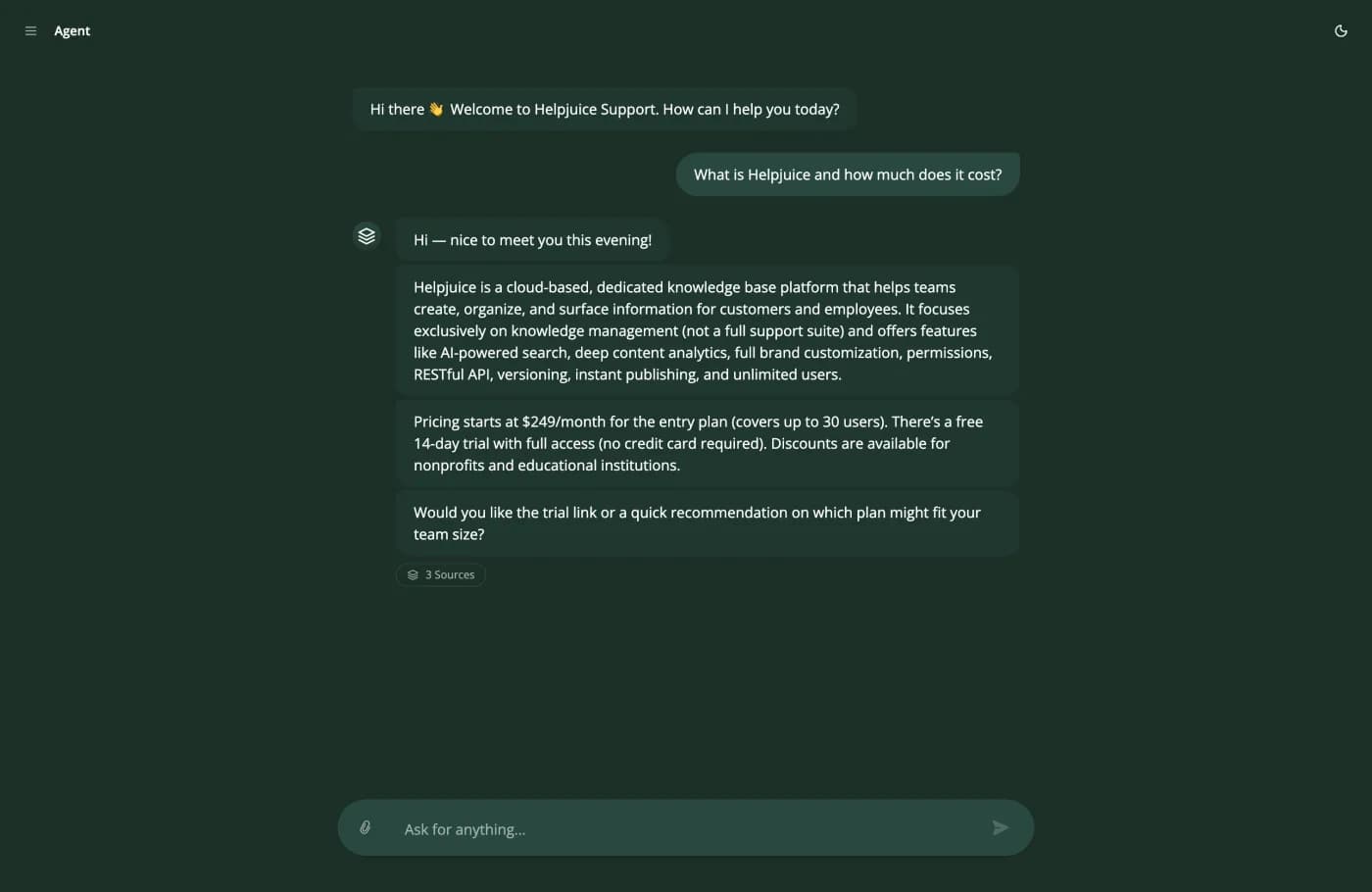
The 3 Sources chip is the whole test. Open it and you get the three articles this answer was written from. A support agent who cannot show their working is a liability, and that is as true of software as it is of people.
What an AI chatbot for customer service really resolves
What a customer service chatbot resolves is the question every buyer asks first, and every vendor answers it with a range that ends in the word "up to". So here is the honest shape of it. There are two populations of numbers in public, they do not overlap, and knowing that is worth more than any single figure.
| Reported rate | Who reported it | Context | How much weight to give it |
|---|---|---|---|
| Up to 93%, average around 67% | Intercom, for Fin | Vendor claim, surfaced in Google's own answer box for Fin pricing questions | Low without a definition of resolution attached. The average matters more than the ceiling. |
| 85%, 76%, 73% | Three vendor case-study videos | Salesforce, SearchUnify and Moveworks customer stories, view counts between 27 and 12,706 | Low. A case study is the best result the vendor could find, selected after the fact. |
| Around 55% overall, 62% to 41% by language | A practitioner running 12 hotel properties | About 2,000 inquiries a day across phone, chat and WhatsApp, after four months | High. First-party, dated, multi-channel, and it publishes the per-language spread nobody else does. |
| 50.4% | Outlearn, from our own telemetry | Self-solve rate across the conversations our agents have handled | Judge it by the denominator, which we have not published. See the caveat below. |
| 40%, alongside customer churn | A practitioner reading churn interviews | Deflection celebrated internally while the churned customers said they gave up | High, and it is the most useful number here because it comes with its cost. |
| Roughly two tickets closed end to end | A managed service provider, after months | An AI ticketing tool on infrastructure support work | High as a floor. Not every workload suits this at all. |
Read that table as one sentence. Every number above 70 percent is a vendor's, and every number a practitioner reports about their own deployment lands between 40 and 62 percent. Nothing sits in between. If you plan on 50 and get 60 you will be delighted. If you plan on 85 you will be explaining a shortfall to whoever signed the contract.
What counts as resolved, and who gets to decide
Before any of those numbers means anything, somebody has to define resolved, and in most contracts that somebody is the vendor. That matters twice over: it decides what you are measuring, and on a per-resolution meter it decides what you are billed.
Two vendors in this guide publish their definition, and both definitions are narrower and more buyer-friendly than you would expect. One states that a conversation the customer escalates does not count and is not charged. One publishes an exclusion list covering answers that were irrelevant, incomplete or transferred. Every other vendor here leaves it to be asked for. Ask for it, in writing, before you sign anything metered on it.
Our own number, and the caveat that belongs next to it
Outlearn's telemetry reports a 50.4% self-solve rate: the share of conversations closed without a human involved. We publish it because zero of the four pages currently ranking for this term publish a first-party number of any kind, measured 8 August 2026. It is also, notably, a worse number than most of the field advertises.
The caveat is the honest part. We have not published the denominator, and a rate without a denominator should be discounted, including ours. Ask us for it, and ask every vendor on your shortlist for it. Three questions separate a real number from a marketing one:
- Over how many conversations? A 90 percent rate over 200 conversations is a pilot, not a benchmark.
- Over what period, ending when? A rate measured during a curated pilot is not the rate you will run at.
- Does a conversation the customer abandoned count as solved? This one question moves published rates by twenty points or more.
- Is it the average or the best customer? Several published figures in this category are a single case study reported as a capability.
- Was any of the volume seeded by the vendor's own team? Rare, but it happens during onboarding and it flatters the first month.
We are also not going to publish an "up to" number anywhere on this site, because one inflated figure would undo the point of publishing the honest one.
Why the number you get will differ from ours anyway
Three variables move it more than the vendor does.
- What share of your volume is answerable from documents at all. A password reset is answerable. A billing dispute usually is not. Two companies with identical software land twenty points apart on this alone.
- Whether your documentation is current and internally consistent. This is the single biggest lever and it is entirely on your side of the line.
- Whether the agent can call your systems. "Where is my order" is unanswerable from documentation and trivial with one API call. Adding actions moves the rate more than changing the model does.
Deflection is the wrong number, and buyers already know it
The metric sold with every customer service chatbot is deflection: conversations that did not reach a human. It is the wrong number, and the people who run support teams worked this out before the vendors did.
“execs loved our automation success rate, 40-something percent deflection, beautiful QBR slides. meanwhile i'm going through churn interviews and people are literally saying i tried to get help and just gave up. that's not deflection, that's abandonment dressed up in a metric.”
That is the objection to answer, and the answer is not to argue with it. It is to change the number. Deflection cannot distinguish a customer who got what they needed from a customer who gave up, and those two outcomes have opposite effects on your revenue.
| Metric | What it counts | How it gets gamed | Pair it with |
|---|---|---|---|
| Deflection rate | Conversations that never reached a human. | Hide or delay the contact route. The number goes up and the customer leaves. | Repeat-contact rate within seven days. |
| Containment rate | Conversations the bot held to the end, whatever the outcome. | Same as deflection, with a friendlier name. | Customer satisfaction on bot-closed conversations only. |
| Resolution rate | Conversations where the customer's problem was solved. | Define resolution as "did not ask again in this session". | The written definition. Get it in the contract if you are billed on it. |
| First contact resolution | Solved on the first interaction, no follow-up needed. | Split one issue into several conversations. | Total contacts per customer per month. |
| Abandonment | Customers who stopped without an answer. Almost nobody reports it. | Not measured, which is how it gets hidden inside deflection. | Nothing. This is the guardrail. |
The three numbers to ask for instead
- Resolution rate, with resolution defined as the customer did not come back about the same thing within seven days. This is a definition a bot cannot game by closing the window.
- Repeat-contact rate on AI-closed conversations. If it is materially higher than on human-closed ones, your deflection number is measuring abandonment.
- Satisfaction on AI-closed conversations only. Blended satisfaction hides the whole effect, because the human-handled conversations carry it.
There is a fourth cost nobody prices, and one practitioner named it precisely: every deflected conversation was a signal about what customers were struggling with, and nobody captured why they were asking. A support queue is a research instrument. Automating it without reading it is throwing away the most honest product feedback you own.
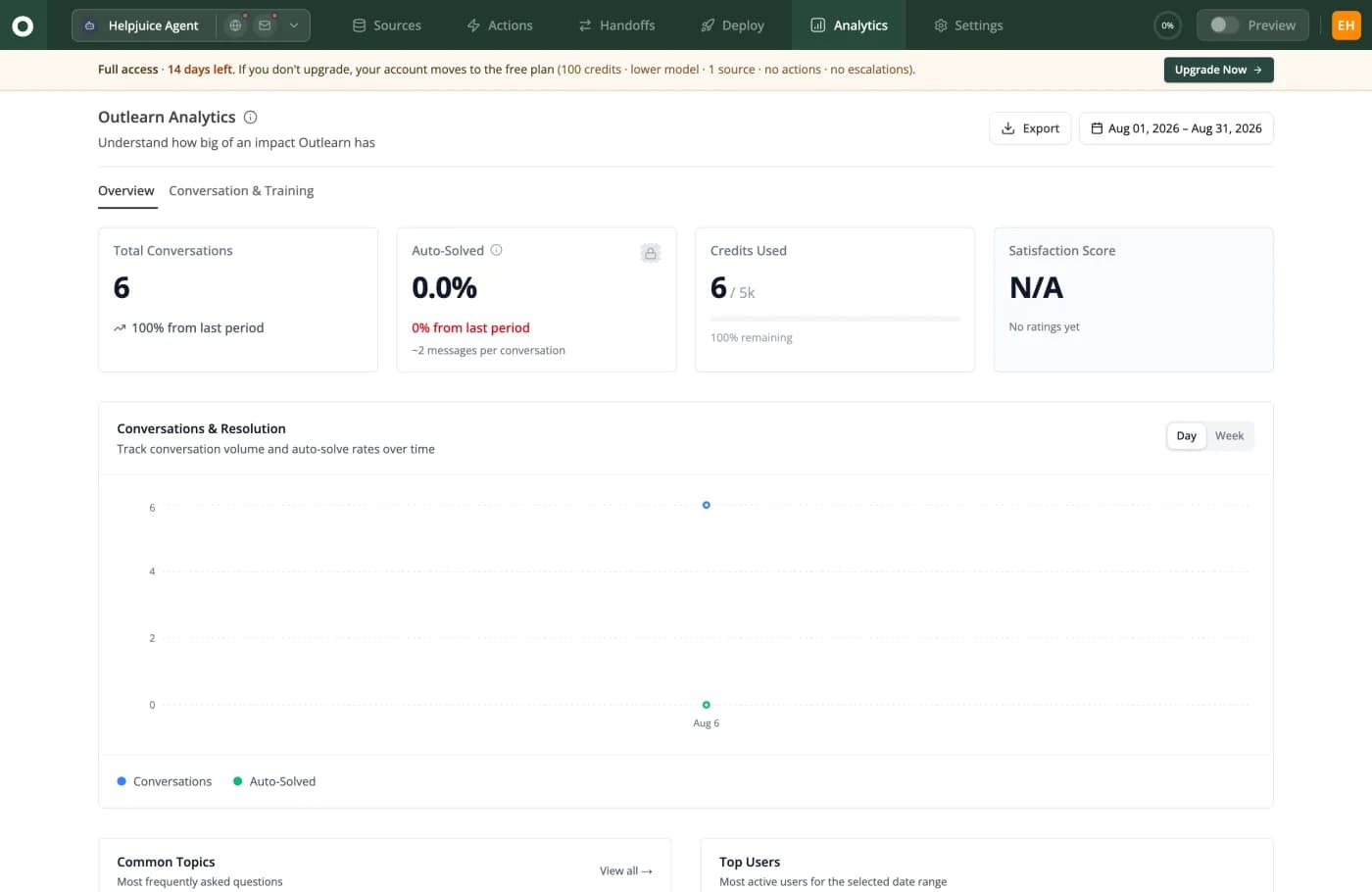
This is a fresh trial account, which is why every number is zero and the satisfaction score reads N/A. The point is which tiles exist: Auto-Solved and Satisfaction Score side by side, plus Common Topics underneath. Rate and guardrail on one screen, and the queue still readable as research.
When a customer service chatbot is the wrong answer
No page selling a customer service chatbot has this section, which is exactly why it is the most useful one here. There are question shapes where a chatbot is worse than nothing, and knowing them before you launch saves you the version of this project that gets switched off in month three.
| Question shape | Chatbot? | Why | Do this instead |
|---|---|---|---|
| "How do I reset my password" | Yes, ideal | High volume, one correct answer, written down, no judgement required. | Nothing. This is the case the category was built for. |
| "Where is my order" | Yes, with an action | The answer is in your database, not your documentation. Retrieval alone cannot answer it. | Give the agent a read-only order lookup before you launch. |
| "You charged me twice and I am furious" | No | The content is a refund and the substance is anger. A correct answer delivered by a machine reads as a brush-off. | Detect the sentiment, skip the answer, route to a person with the transcript. |
| "Can I get an exception to your policy" | No | There is no documented answer, because the answer is a judgement somebody is accountable for. | Escalate immediately. Never let the agent guess at a commitment. |
| Anything legal, medical or safety-critical | No | A wrong answer is not a bad experience, it is liability, and it is irreversible. | Keep it out of the agent's scope entirely rather than trusting a guardrail. |
| Questions whose answer is not written down | No | Retrieval cannot retrieve what does not exist. It will answer from something adjacent. | Write the answer down. Then it becomes row one. |
| Questions your documentation answers twice, differently | No, actively harmful | The agent will confidently pick one of the two contradictions, and you will not know which. | Fix the contradiction first. This is the most common preventable failure. |
| Under roughly thirty conversations a week | Probably not | A person replying in ten minutes is better, and the setup work will not pay back. | Write a good FAQ page and revisit when volume triples. |
Three tests before you let it answer a question type
Run these against every row you are tempted to move from the no column to the yes column. An AI chatbot for customer service earns a question type, it does not get one by default.
- Is there exactly one correct answer, written down, today? Not "roughly", and not "in the runbook somewhere".
- Would you let a new hire on their second day answer it from that document alone? If no, the agent should not either.
- If the answer is wrong, can it be undone in under a day? If not, this question type stays with a person regardless of how well the demo went.
- Would a customer asking this be angry before they typed it? Anger is a routing signal, not a content problem.
- Does answering it require knowing who is asking? If yes, it needs identity before it needs an answer.
Which channels a customer service chatbot suits
Channel changes the answer as much as question shape does, and almost no guide separates the two.
| Channel | Good fit? | What changes | What breaks if you ignore it |
|---|---|---|---|
| Website chat widget | Yes, the strongest case | Mostly anonymous visitors, so answers must come from public documentation only. | Internal content reaching a stranger, because nothing scoped the retrieval. |
| In-app chat for signed-in customers | Yes, and the highest value | You know who is asking, so answers can be scoped to their plan and their data. | Answering a paying customer from the free-tier documentation, which reads as incompetence. |
| Yes, with care | No conversation turn to recover in. One reply is the whole interaction. | A wrong answer with no chance to correct it before the customer acts on it. | |
| Internal Slack or Teams | Yes, and it is underrated | The audience is your own staff, so internal runbooks are in scope and tone matters less. | Nothing much. This is the safest place to start and most teams skip it. |
| WhatsApp, Instagram and social DMs | Sometimes | Identity is weak and the expectation of a human is stronger. | A frustrated customer with a public account and an audience. |
| Phone and voice | Rarely, and not first | No transcript to read, no way to skim, and escalation has to be instant. | The single most complained-about experience in the whole category. |
Outlearn covers web chat, email, phone, Slack, Microsoft Teams and Google Chat. It does not do WhatsApp or Instagram, so the social-DM row is not something we can sell you and we would rather write that here than in a footnote.
The organisational reason projects like this stall
It has nothing to do with the software, and it appears on no vendor page anywhere.
“Do you want AI to replace your team cuz this is how you get AI to replace your team. Let's say you managed to successfully introduce it and your ticket volumes drop by 25%. Guess which department's budget is going to get the ax for being too efficient now.”
If you are the person championing this internally, that is your real risk and it is worth naming out loud early. The framing that survives is capacity redeployment rather than headcount: the same team handles the exceptions, the escalations and the proactive work it never had time for, and the queue stops being the ceiling on what support can do. Decide which of those you are actually buying before you present the business case, because the answer determines which number you should report each month.
Six ways an AI chatbot for customer service breaks in production
Ranked by how often practitioners describe them in public. Each failure mode below has a test you can run inside a trial, which is worth more than any feature checkbox on any AI chatbot for customer service comparison.
1. It invents policy, confidently
The failure that carries a commercial consequence rather than an awkward transcript. A customer is told they do not need to return an item to get a refund, and now your company has either made that true or made an enemy.
The mechanism is that the model answers from general knowledge when retrieval finds nothing. Test: ask the trial agent about a policy your documentation does not cover. A well-built agent says it cannot find that and offers a person. A poorly built one writes you a plausible policy.
2. More knowledge makes it worse
This is counterintuitive and extremely common. One team fed three years of conversations plus hundreds of documentation pages to an agent and it still could not answer how to log in. They eventually disabled everything, gave it one FAQ file, and it still failed. Their final decision was to delete three years of documentation and start over.
Contradictions and stale pages do not average out. They compete, and retrieval picks a winner you did not choose. Test: search your own documentation for your refund window. If you find two different numbers, you have found the problem, and no vendor fixes it for you.
3. It closes tickets it did not solve
“It kept closing tickets with have you tried turning it off and on again? as the solution for everything. Including a server fire.”
Funny once, expensive repeatedly, and it is what a deflection target does to a system when nobody measures the other side. Test: ask for the repeat-contact rate on AI-closed conversations during the trial, not after.
4. Escalation is broken, hidden, or circular
The most viscerally described failure in every public forum. Customers type "I want to talk to a human", repeatedly, and get routed back to another bot. One customer reported being locked out of their store for a month with no route to a person.
What buyers say they want here is simple and almost nobody ships it: tell me it is a bot, and give me the option to speak to a human. One put it as looking for an easter egg. Test: make "I want to talk to a human" the first sentence you ever send the trial agent. If that does not work on the first attempt, stop evaluating.
5. Permissions are a blast radius
“AI configured to resolve T1 tickets. Budget untouched. Good customer service. Pick two. And, if you picked the autonomous agent, gain a 100-sided Law of Large Numbers dice. Every day, roll the dice. On a 1, your autonomous agent breaks something. For every permission it has, roll again.”
The arithmetic is right, and the mitigation is to hold the number of dice down: read-only actions first, write actions only after the read-only ones have behaved for weeks, and nothing touching passwords or account access. Test: ask for the full list of what the agent can call, and what is logged when it calls it.
6. It behaves differently in the sandbox than in production
The most specific and least discussed of the six. One team reported that training-window behaviour did not match live-conversation behaviour, which makes every pre-launch test meaningless.
Usually the cause is that the two paths do not share the same retrieval scope, the same identity, or the same model. Test: ask whether the preview and the live widget run identical retrieval and identical model settings, then confirm it by asking both the same awkward question and diffing the replies.
All six quotes above are from public threads, linked in the sources section. We have not paraphrased them into something more flattering, and one of them is about a product category we sell.
What a customer service chatbot costs, in one comparable unit
This is the section that does not exist anywhere else, so it is worth explaining why before the table.
Why customer service chatbot prices cannot be compared as published
No two vendors in this category sell the same unit. One charges per seat, one per resolution, one per ticket whether anything was resolved or not, one per credit that varies with the model you pick, and one charges two meters for a single conversation. Published roundups mostly reprint the headline numbers side by side, which is how a pricing table ends up putting "from $0.09 per interaction" in the same column as "from $209 per month per technician" and "from $23.20 a month billed annually".
That is not a comparison. It is three different questions answered next to each other. So here is the arithmetic instead: the same thousand resolved conversations, costed against every vendor's own published pricing page, in one unit.
| Vendor | Cost per resolved conversation | Monthly total | What the meter counts | Plan this lands on |
|---|---|---|---|---|
| Chatbase | $0.12 | $120 | Per AI response | Standard. 4,000 credits. |
| Outlearn | $0.20 | $199 | Per AI response | Growth. 4,000 credits. |
| Zoho Desk | $0.23 | $230 | Per seat | Professional x 10 seats. Billed annually; AI metered in LLM tokens, not resolutions. |
| Front | $0.35 | $350 | Per seat | Starter x 10 seats. Annual commit; no monthly price published. |
| Help Scout | $1.00 | $1,000 | Per seat | Standard x 10 seats. 10 seats + 1,000 AI resolutions. |
| Intercom Fin | $1.28 | $1,280 | Per Fin outcome | Essential x 10 seats + Fin. Billed annually; Fin is not billed when a conversation escalates to a human. |
| Tidio Lyro | $1.43 | $1,429 | Per Lyro conversation | Premium, sales-quoted. Above 1,000 Tidio publishes no price; shown at their $0.70 floor. |
| Gorgias | $1.69 | $1,686 | Per automated interaction | Pro + overage. Annual billing; AI Agent bundled into the card price. |
| Helply | $2.00 | $2,000 | Per ticket | $1 per ticket. Annual contract, $3,000/yr minimum. |
| LiveChat | $2.07 | $2,072 | Per seat | Team + ChatBot Growth. Billed annually; the AI agent is a separate ChatBot.com subscription. |
The spread is 17.3x for the same outcome, from $0.12 at Chatbase to $2.07 at LiveChat, and almost none of it is about answer quality. It is about which meter you signed. Outlearn is row 2 of 10 at $0.20, and Chatbase is cheaper than us.
How the ranking changes with volume
One volume is not enough, because the order is not stable. A seat-priced product looks expensive at 250 conversations and reasonable at 4,000, since the seats are already paid for. A per-unit meter looks cheap at 250 and does not improve. Any customer service chatbot comparison quoted at a single volume has quietly chosen the volume that flattered somebody.
| Vendor | 250 resolved / mo | 1,000 resolved / mo | 4,000 resolved / mo | What moves the number |
|---|---|---|---|---|
| Chatbase | $0.48 | $0.12 | $0.11 | Falls 4.4x across the range, because the fixed part of the bill is already paid for by the time volume arrives. |
| Outlearn | $0.40 | $0.20 | $0.15 | Falls 2.6x across the range, because the fixed part of the bill is already paid for by the time volume arrives. |
| Zoho Desk | $0.92 | $0.23 | $0.06 | Falls 15.7x across the range, because the fixed part of the bill is already paid for by the time volume arrives. |
| Front | $1.10 | $0.35 | $0.16 | Falls 6.8x across the range, because the fixed part of the bill is already paid for by the time volume arrives. |
| Help Scout | $1.75 | $1.00 | $0.81 | Falls 2.2x across the range, because the fixed part of the bill is already paid for by the time volume arrives. |
| Intercom Fin | $2.15 | $1.28 | $1.06 | Falls 2.0x across the range, because the fixed part of the bill is already paid for by the time volume arrives. |
| Tidio Lyro | $1.52 | $1.43 | $1.41 | Flat within 8% across a sixteenfold volume increase. The meter is the bill, so growing does not help you. |
| Gorgias | $1.95 | $1.69 | $1.88 | Flat within 4% across a sixteenfold volume increase. The meter is the bill, so growing does not help you. |
| Helply | $2.00 | $2.00 | $2.00 | Flat within 0% across a sixteenfold volume increase. The meter is the bill, so growing does not help you. |
| LiveChat | $5.32 | $2.07 | $1.26 | Falls 4.2x across the range, because the fixed part of the bill is already paid for by the time volume arrives. |
The practical read: below roughly 500 resolved conversations a month, plan floors and seat minimums decide your bill and the meter barely matters. Above a few thousand, the meter is the only thing that matters and a per-outcome rate compounds against you exactly as your agent improves.
How to re-run this on your own numbers
Take your monthly count of conversations you believe a customer service chatbot could resolve. Multiply by the resolution rate you actually expect, which the section above suggests should be around 50 percent rather than 85. That is your resolved-conversation count. Then, for each vendor, work out the total bill at that volume including seats, and divide by that count. If you already track cost per ticket for your human team, this is the same arithmetic with the denominator swapped for resolved conversations.
- Trap one. A per-resolution meter looks cheapest at low volume and gets worse as the agent improves, because a better agent resolves more.
- Trap two. A per-ticket meter charges you for conversations the AI did not resolve, so a low resolution rate makes it dramatically worse rather than cheaper.
- Trap three. A credit meter multiplies by the model you choose, and the cheap headline rate is almost never the model you would actually run.
- Trap four. Seat floors. One plan in the table bills a ten-seat minimum, so a five-person team pays for ten before the AI does anything.
Every comparison page on this site carries an interactive version of this calculation with your own numbers in it. Compare the field side by side, or read our pricing for the plan and credit detail behind our own row.
Assumptions, stated so you can disagree with them. Ten seats, because that is the seat floor the seat-priced vendors are shaped around. A 50% resolution rate, used to derive how many conversations must run through a per-ticket or per-conversation meter to yield 1,000 resolutions. Four AI replies per resolved conversation on the credit-metered vendors, which is our assumption and not anyone's data. Annual billing where a vendor's default is annual. Every price read from the vendor's own pricing page on 2026-08-07. Zendesk has no row because its own page defines the unit clearly, "you pay only for customer requests that were successfully resolved", but the rate is rendered in the browser and never appears in the served page, and a guessed rate is worse than no row. Both Outlearn and Chatbase charge more per reply for a more expensive model, which multiplies both of those rows by an amount neither of us publishes cleanly, so treat this table as a floor.
The five meters, and which one punishes you for succeeding
Once you have the table above, the more useful question is what each customer service chatbot meter rewards. This is where the money actually goes, and buyers have reasoned it out more clearly than vendors have.
| Meter | You are charged when | Where it bites | Ask them this |
|---|---|---|---|
| Per seat | You employ a support person, whether or not the AI does anything. | Seat floors and tier caps. One plan bills a ten-seat minimum, so a five-person team pays for ten. | What is the minimum seat count, and what happens to my price at seat eleven? |
| Per resolution | The AI resolves a conversation, by the vendor's definition of resolved. | Success costs money, so the better it works the more you pay. And you are trusting their definition. | Show me the written definition of a resolution, and what happens when the customer escalates. |
| Per ticket or conversation | A conversation reaches the AI at all, resolved or not. | You pay for failures. A low resolution rate makes this meter worse, not cheaper. | Am I billed when the AI hands off immediately without answering? |
| Per AI reply or credit | The AI writes a reply. A longer conversation costs more. | Model choice multiplies everything, and unused credits usually do not roll over. | What does one reply cost on the model I would really run, and do credits expire? |
| Two meters at once | One conversation bills as a ticket and again as an automated interaction. | A conversation the AI fully resolves costs two units. One it fails costs one. | Does a fully resolved conversation bill both meters? |
Which meter to pick for the resolution rate you expect
- If you expect a low resolution rate at first, which almost everyone does, avoid per-ticket and per-conversation meters. They charge you for the failures, and failures are what you will have most of in month one.
- If you expect a high resolution rate, per-resolution and per-outcome meters get expensive precisely as the project succeeds. Model the bill at the rate you are aiming for, not the rate you have.
- If your volume is spiky, a credit meter with no rollover is a tax on your quiet months. Ask whether credits expire.
- If your headcount is growing, a seat meter is the only one that rises without any customer asking you anything.
The success tax, argued by the people paying it
“What eventually clicked for us was realizing the problem isn't just train the model better. It's structural: per-resolution pricing means every correct answer costs you, so you're financially punished for making it work well. That's a misaligned incentive baked into the platform.”
Buyers reached the same conclusion two years earlier, from the demand side rather than the cost side: if customers start using the assistant as a faster way to search your documentation, volume rises because answers are instant, and a per-unit meter turns that into a bill.
We are not exempt and we are not going to pretend to be. Outlearn bills every AI reply, including the ones that miss, and a conversation that takes six exchanges before a human takes over costs six units. Two competitors have kinder designs on this specific axis, and both say so on their own pages: one charges once per resolved conversation and explicitly does not charge when the customer escalates, and one publishes an exclusion list and does not bill a resolution that was irrelevant, incomplete or transferred. If your resolution rate is going to be low at first, that difference is real money.
- The one question worth asking every vendor, including us: does this meter charge me when the bot fails? Our answer is yes, it does.
- The second question: what did this cost the customer sitting next to me in volume terms, and can you show me the arithmetic rather than the plan name?
- The third: which features in this plan can you remove later without my agreement? Repricing, not price level, is what the angriest public reviews in this category are actually about.
The vendors, compared on the two things nobody scores
There is no shortage of ranked lists of AI chatbot for customer service products. What there is a shortage of is a list that scores the two things that actually decide whether the deployment survives: what the meter does when the bot gives up, and what one resolved conversation really costs. We have both, computed from published prices, so this section is that list rather than another one.
Two things we deliberately do not do here. We do not rank ourselves first, because we sell one of these and a self-awarded top spot is worth nothing to you. And we do not score handoff quality as an experience, because we have not run all ten products in production and inventing a score would be exactly the behaviour this guide criticises. What we score is the published, checkable half: what the bill does at the moment of handoff.
| Vendor | Cost per resolved conversation | Billing unit | Charged when the AI fails? |
|---|---|---|---|
| Chatbase | $0.12 | Per AI reply, as credits | Yes. Credits are spent on the reply, resolved or not. |
| Outlearn | $0.20 | Per AI reply, as credits | Yes, every reply. This row runs against us. |
| Zoho Desk | $0.23 | Per seat, AI metered in tokens | Effectively no. 30 million AI tokens a month are included. |
| Front | $0.35 | Per seat, plus per conversation | Yes. Their AI add-on bills per conversation, not per resolution. |
| Help Scout | $1.00 | Per seat, plus per resolution | No. Their own FAQ says an escalated conversation is not billed. |
| Intercom Fin | $1.28 | Per seat, plus per outcome | No. Their own structured data marks the Fin offer per outcome. |
| Tidio Lyro | $1.43 | Per AI conversation | Yes. The meter fires on the first reply, not on a resolution. |
| Gorgias | $1.69 | Per ticket and per automated interaction | Yes, and success bills twice while failure bills once. |
| Helply | $2.00 | Per ticket | Yes. Every ticket that reaches it is billed, AI-resolved or not. |
| LiveChat with ChatBot | $2.07 | Per seat on two products, plus resolution packs | No. They publish an exclusion list covering transferred answers. |
What the cheap end and the expensive end are actually buying
The two ends of that table are not the same product at different prices, and the gap is worth understanding before you optimise for the number.
- The cheapest rows are credit-metered chat builders and a low-cost helpdesk. You upload or crawl your content, embed a widget, and the meter charges for replies. Little of the bill is attached to headcount, which is why the per-resolution figure is low.
- The most expensive rows are per-ticket and per-outcome products sitting on a helpdesk. You are buying the inbox, the queue and the AI on one bill, and the AI line is priced as an outcome rather than as compute.
- Our own row sits second because we have no seat charge and a credit meter, and it would sit higher if we shipped an inbox. We do not. Outlearn hands conversations into the helpdesk you already run, so for most readers this is an AI layer decision rather than a helpdesk replacement.
If you want the per-vendor argument in detail rather than one row, every one of these has its own comparison on this site with the pricing arithmetic worked through and the places we lose marked as losses: Chatbase, Help Scout, Front, Gorgias, Tidio, Zoho Desk, LiveChat and Helply.
How to read any AI chatbot for customer service ranking, including this one
We measured the four listicles currently ranking for this cluster on 8 August 2026. What we found is a reasonable checklist for reading any of them.
- Check whether the author sells a competing product, and whether they disclose it. One page ranks itself first inside a section headed "6 Best" with no disclosure. Another publishes a self-rating of 4.9 from 171 reviews in structured data, inside an editorial ranking of eleven competitors it is not one of.
- Check whether every vendor is scored, or only the convenient ones. One page rates seven of its ten entries and hands out three perfect fives out of the seven it rated.
- Check whether the page sells placement. One of the four operates an advertising page offering paid placement in reviews and listicles, under a heading about why you should trust its reviews.
- Check the year in the title against the byline. One page's title says 2026 and its visible byline says October of the previous year.
- Check whether the prices are normalised. One page's pricing table puts a per-interaction rate, a per-technician monthly rate and a per-agent annual rate in the same column, which is not a comparison.
Applying that same checklist to this page: we sell one of the ten products, we say so at the top and in every section, we do not rank ourselves first, we take no payment for inclusion, we score the whole field on the same computed number, and the two rows where a competitor's design is better than ours say so in the cell.
What happens at the handoff, and what it costs you
Handoff is the part of an AI chatbot for customer service that breaks in production, and the part nobody scores. Measured 8 August 2026, not one of the four ranked lists holding this SERP has a column, a heading or a rubric line for how well a bot hands a conversation to a person. It is also the moment your customer decides whether the whole deployment was a good idea.
The three questions inside a handoff
Buyers usually only ask the first one. The third is the one that shows up on the invoice.
| Question | A good answer | A bad answer | How to test it in ten minutes |
|---|---|---|---|
| Can the customer always reach a person? | Asking plainly works on the first attempt, every time, in every channel. | It works sometimes, or after three attempts, or only through a menu. | Type "I want to talk to a human" as your first message. Then try it again mid-answer. |
| Does the person get the context? | The full transcript arrives with the conversation, in the inbox the team already uses. | The agent gets a summary, or a notification, and asks the customer to start again. | Hand off a five-message conversation and read what lands on the agent's side. |
| Does the meter stop? | Billing stops at the handoff, and a conversation the AI did not resolve is not billed as one. | The failed conversation is billed anyway, sometimes twice. | Ask for it in writing. Three of the ten vendors above publish the answer; the rest you must ask. |
What Outlearn does here, including the limits
This is the axis we have built most deliberately, because our handoff guide exists as a shipped setup document rather than a promise. If the inbox on the other side is Zendesk, the Zendesk AI chatbot use case covers that pairing specifically.
- Handoff is a top-level part of the product, not a branch inside a flow builder. Eight providers are wired: Zendesk, Intercom, LiveChat, Slack and four more.
- The full transcript goes with the conversation, so the person picking it up has the context immediately rather than asking the customer to repeat themselves.
- An existing open conversation is reused rather than duplicated, so your agent does not end up with two threads about one problem.
- Closing it on the human side closes it in Outlearn, which is the small detail that stops the two systems drifting apart.
- The honest limit: we bill every AI reply, so the replies before a handoff are billed even though the conversation ended with a person. Two vendors in the table above handle that better and we have said so twice on this page.
- The second honest limit: escalations are not available on our free tier at all, so a free-tier evaluation cannot test the most important thing in this section.
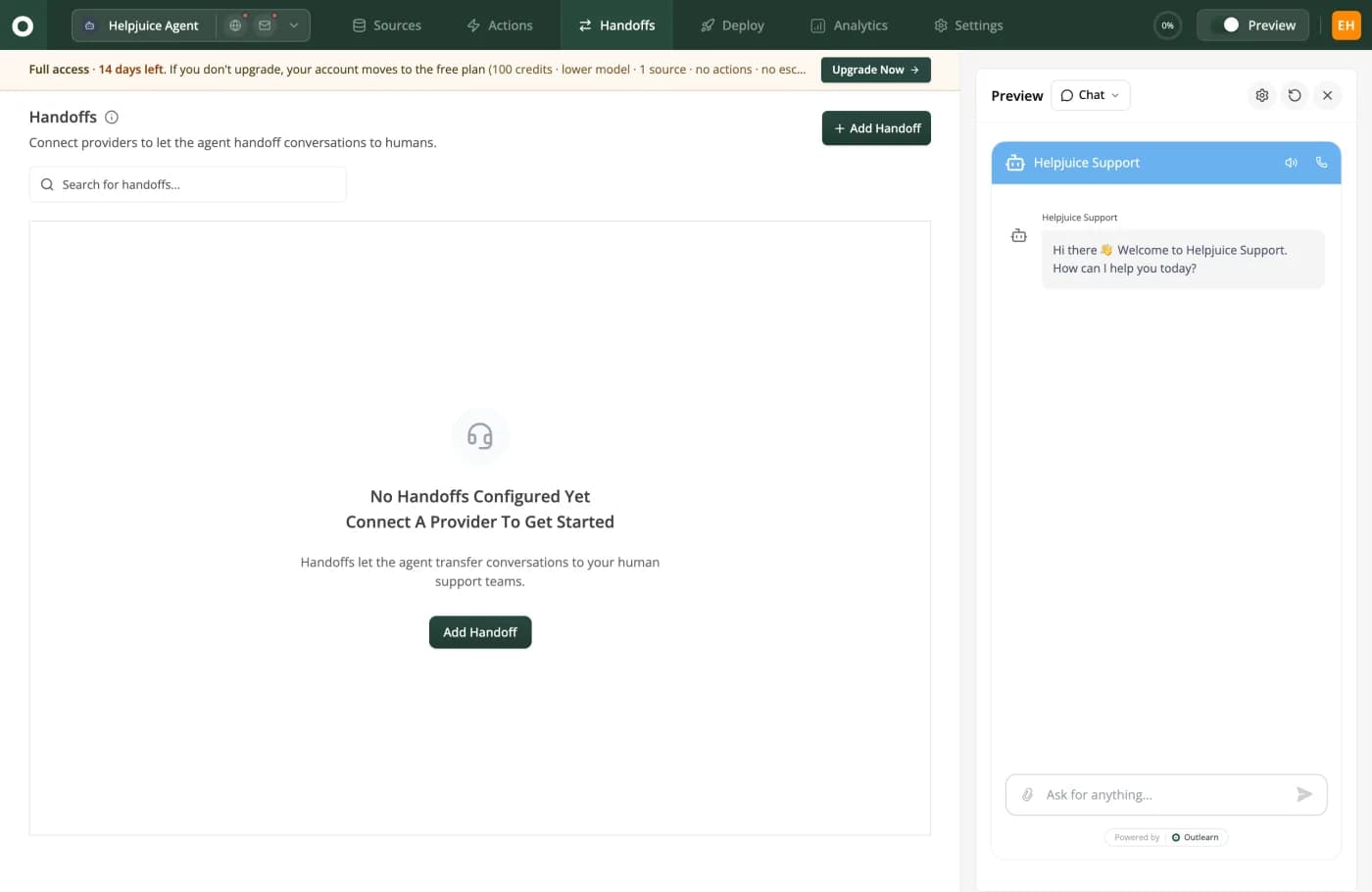
A deliberately unflattering screenshot: this is the empty state on a fresh account, and it says No Handoffs Configured Yet. The point is where Handoffs sits, as one of six top-level tabs beside Sources and Actions. Escalation is a first-class part of the product rather than a setting buried three levels inside a flow.
Build it yourself, or buy it
Worth taking seriously, because a working AI chatbot for customer service prototype is genuinely a weekend's work now and several teams in public forums have built their own rather than buy. The honest answer is that the build is cheap and the ownership is not.
| Dimension | Build it yourself | Buy a chat builder | Buy an agent platform |
|---|---|---|---|
| Time to first useful answer | A weekend for a prototype on your own documentation. | An afternoon, including embedding the widget. | An afternoon, plus a day if you connect several systems. |
| Keeping knowledge current | You write and maintain every connector, and they break on the vendor's schedule. | Usually manual re-upload, which means it silently goes stale. | Scheduled re-reads of the original systems. |
| Escalation into your inbox | You build it, including transcript transfer and closing both sides. | Often a notification rather than a real handoff. | Wired providers, transcript included. |
| Knowing whether a change made it worse | You build the evaluation harness too, and this is the part everyone skips. | Basic analytics, rarely a regression view. | Resolution and satisfaction reporting out of the box. |
| Per-user permissions on answers | Possible, and the hardest thing on this list to get right. | Not offered. | Sometimes, and read the scope carefully. |
| Who owns it in eighteen months | Whoever wrote it, or nobody, which is the common outcome. | The vendor, within the limits of their roadmap. | The vendor, within the limits of their roadmap. |
When building genuinely wins
- One narrow, high-volume job with a stable answer, such as order status against a single API. Scope it small and the maintenance stays small.
- A hard data-residency requirement that no vendor on your shortlist can satisfy. One team rejected the vendor with the best voice quality purely on data sovereignty, which is a rational trade.
- Your differentiator is the conversation itself, in which case do not outsource it.
What tips it the other way, in the words of the people who tried: an agent pointed at a system full of low-quality notes produces low-quality answers, and that problem is identical whether you built the retrieval or bought it. If you are choosing between building and buying to avoid cleaning up your documentation, neither option helps.
And the open-source question
It is one of the most common follow-up searches on every term in this category, and the honest answer has two halves. Here is the split, concretely.
- Available in open source, and genuinely good: the retrieval layer, the chat interface, the embedding pipeline and the model plumbing. One of the highest-scoring public threads about a leading vendor in this space is about cloning it with open-source components rather than buying it.
- Available, but you will maintain it: connectors to commercial systems. They exist and they break whenever the upstream API moves, which is somebody's Thursday afternoon forever.
- Not really available: escalation into a commercial inbox with the transcript attached, closing both sides, and reusing an existing thread.
- Not available at all: the evaluation harness that tells you whether last week's change made answers worse. This is the single most valuable thing a mature vendor has and nobody ships it as a library.
- Not available and rarely discussed: per-end-user permission scoping on retrieval, which is hard to build correctly and dangerous to build incorrectly.
- Also yours to build: the analytics that separate resolution from abandonment, which is the whole subject of the metrics section above.
- Budget for all six and the build-versus-buy comparison becomes an honest one. Budget for the first bullet only, which is the usual mistake, and it does not.
Getting your knowledge ready, which is most of the work
The single most repeated sentence in public discussion of this category: if your knowledge base is messy, AI will not magically fix it. An AI chatbot for customer service is a reading machine, and it can only be as right as the thing it reads. Everything else in this guide is downstream of that.
| Check | How to run it | Why it decides the outcome |
|---|---|---|
| Do your top twenty questions have an answer at all? | Pull last month's twenty highest-volume tickets. Find the document that answers each. | Any question with no document is a question the agent will answer from something adjacent, or invent. |
| Does anything contradict itself? | Search for your refund window, your SLA and your trial length. Count distinct answers. | Retrieval picks one contradiction and you do not get to choose which. This is failure mode two. |
| Is it current? | Sort by last-modified date. Read anything older than a year that is still linked. | Stale documents do not announce themselves. They answer confidently. |
| Are the headings the questions people ask? | Read your headings without the body text. Do they read as questions or as internal nouns? | Retrieval leans heavily on headings and titles. Rewriting a few headings often moves accuracy more than changing the model. |
| Is anything internal-only mixed in? | Grep for pricing exceptions, escalation runbooks and named accounts. | Anything the agent can reach, a visitor can eventually talk it into repeating. |
| Where does it actually live? | List the systems. Help centre, Confluence, a Drive folder, somebody's Notion, three pinned Slack messages. | This determines which products can even see your answers. Most read a copy you upload. |
Connected knowledge versus uploaded knowledge
This is the structural distinction that decides whether your agent is still correct in month six, and it is the one Outlearn is built around, so read it with that in mind.
Most products in this category learn from a copy. You upload the documents or crawl the site once, it works, and then somebody edits the original and the copy keeps answering. Nothing errors. The agent just becomes quietly wrong, which is worse than being obviously broken.
Outlearn reads the originals: 20 third-party systems including Confluence, SharePoint, Google Drive, OneDrive, Box, Dropbox, GitHub, Slack, Microsoft Teams, Salesforce and five helpdesk knowledge bases, re-read every 30 minutes on a paid plan. Edit the policy on Tuesday and Tuesday's customers get the new answer. Two honest limits: auto-sync is a paid feature and is off on the free tier, and we read documentation rather than your historical conversations.
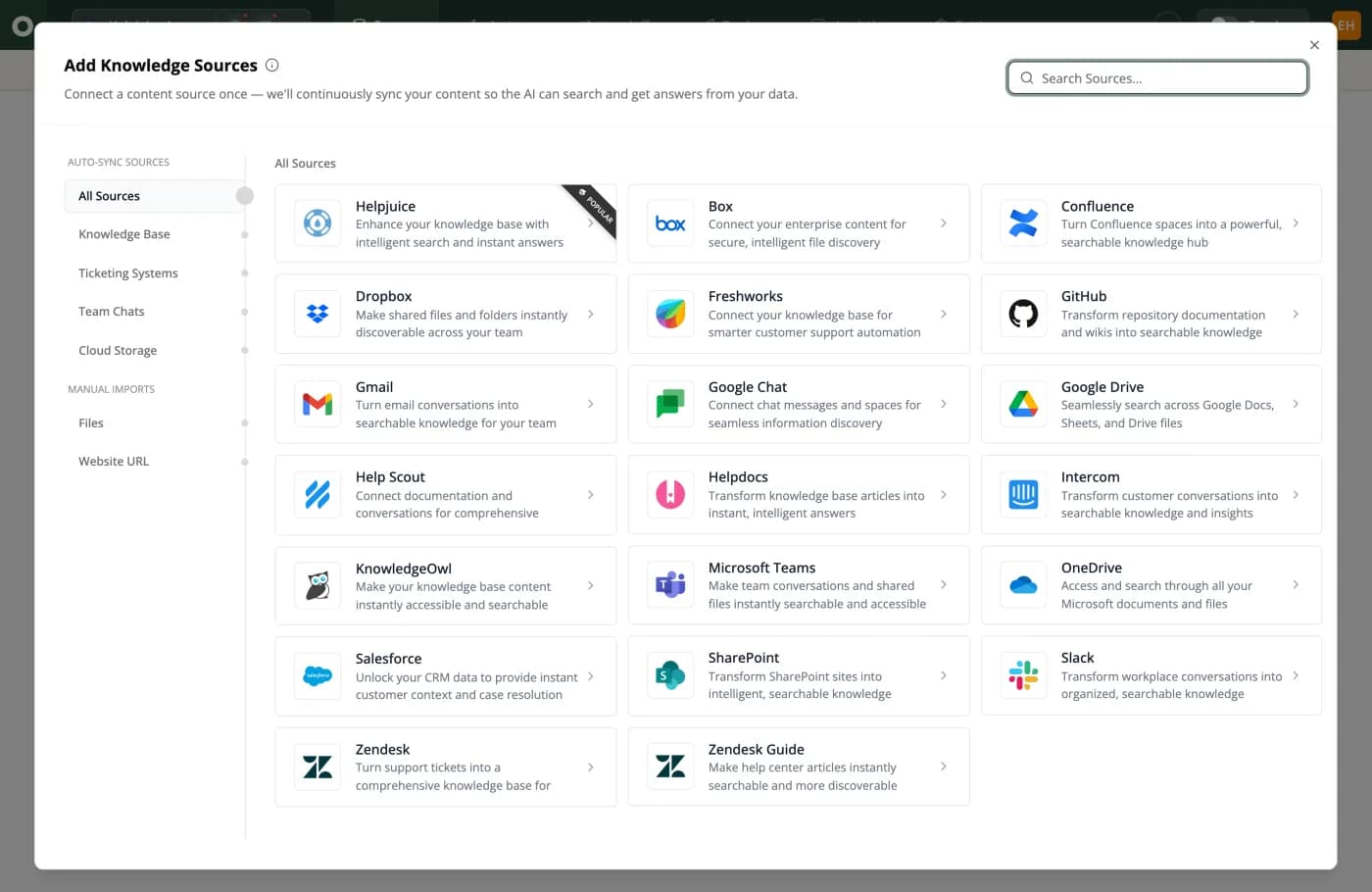
Auto-Sync Sources above the divider, Manual Imports below it. Many products in this category only have the bottom half, and the pricing page does not tell you that. Outlearn's own words for the top half: "Connect a content source once and we'll continuously sync your content."
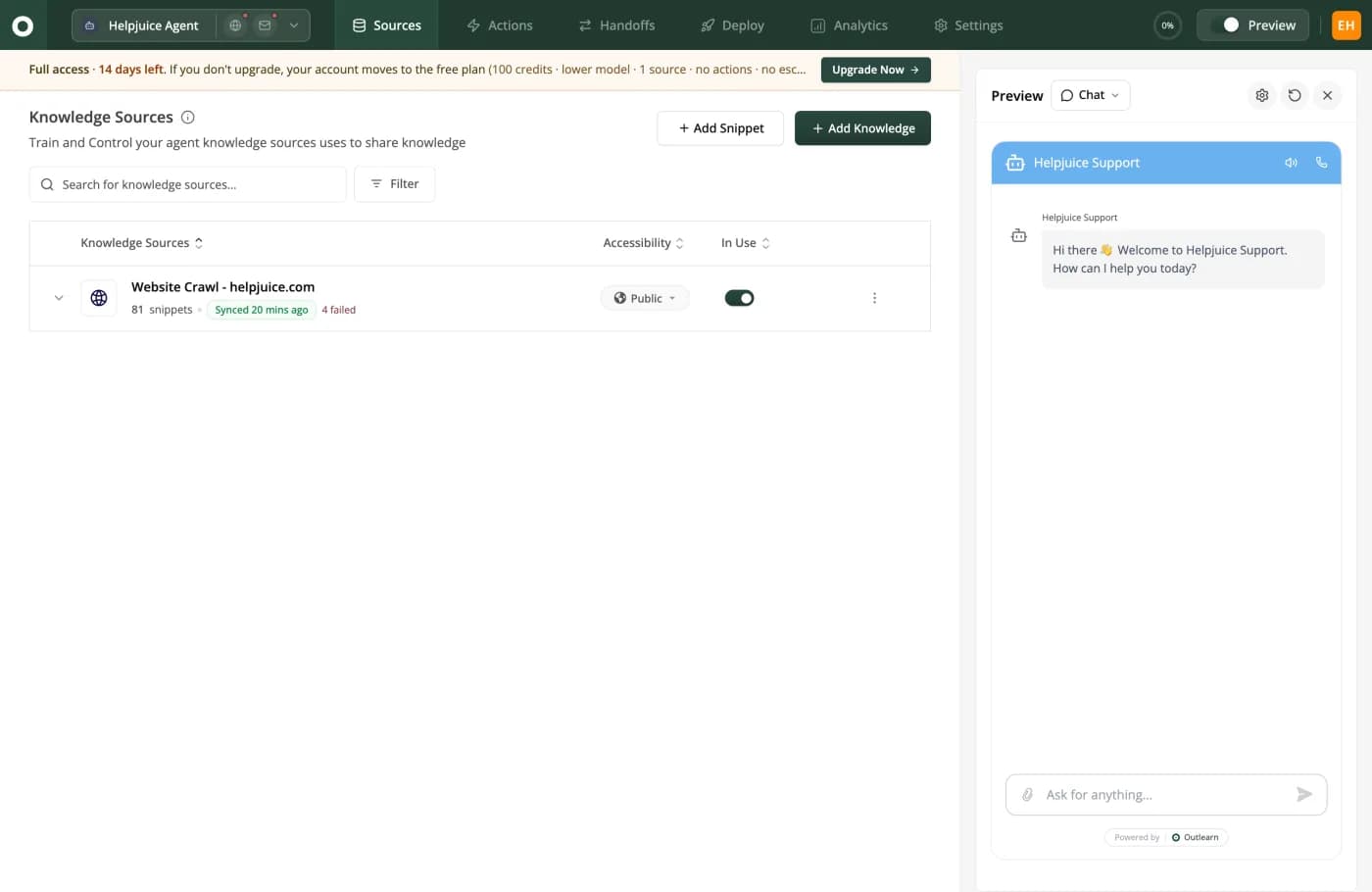
Synced 20 mins ago is what reading the original looks like from the inside. The same row says 4 failed in red. A source that quietly stopped importing half its content is more dangerous than one that never ran, so it should say so on the row rather than in a log.
The twenty-document rule
If you take one operational instruction from this guide, take this one. Do not start by connecting everything. Start with the twenty documents that answer your twenty most common questions, make sure those twenty are correct, current and mutually consistent, and launch on those alone.
Then add sources one at a time, watching the resolution rate after each. The teams who describe the worst outcomes in public did the opposite: connected three years of everything on day one, watched quality fall, and could not tell which source was responsible.
How long it takes, week by week
Nobody publishes this honestly, and the four guides ranking for this term do not state an implementation timeline at all. Answering your first real question takes an afternoon. Getting a customer service chatbot live to all of your customers takes four to twelve weeks, and the variable is almost never the software. The weeks right after go-live deserve a support plan of their own, which is what the hypercare guide covers.
The eight steps, in the order that works
The order matters more than the content of any single step. Two of these are routinely done last and are the reason projects slip: escalation, and the security review.
- 1
Week 1. Pick twenty questions and write the answers down
Not two hundred. Pull your twenty highest-volume tickets from last month and check that each one has a single, current, findable answer somewhere. This is the week most projects skip and the reason most of them stall. If two documents disagree about your refund window, no model resolves that for you.
- 2
Week 1. Connect the knowledge, do not export it
Point the agent at the systems the answers already live in rather than uploading a copy. Outlearn reads 20 third-party systems and re-reads them every 30 minutes on a paid plan, so an edit in Confluence changes the answer the same afternoon. An upload is a fossil the moment somebody edits the original.
- 3
Week 2. Turn on escalation before you turn on traffic
Configure the handoff into whatever inbox your team already works in, and test the sentence "I want to talk to a human" as the very first thing you type. If that does not work on the first try, nothing downstream matters.
- 4
Week 2. Replay last month's tickets against it
Take 100 real closed conversations and put the customer's opening message to the agent. Grade each reply as correct, incomplete or wrong. You now have a resolution rate on your own traffic instead of a number from a vendor deck.
- 5
Week 3. Ship it to one channel and one segment
One channel, ideally the lowest-stakes one, and one audience. Logged-in customers on the billing page, or anonymous visitors on the docs site. Not everywhere at once, because your first week of real traffic will find question shapes your backlog did not contain.
- 6
Week 4. Add actions, in order of blast radius
Read-only first. Order lookup, subscription status, licence check. Anything that writes, refunds, cancels or resets waits until you have watched the read-only ones behave for a fortnight.
- 7
Weeks 5 to 8. Widen the audience and start the weekly review
Thirty minutes a week reading conversations the agent got wrong is worth more than any configuration change. Every wrong answer is either a missing document, a contradictory document or a question that should always reach a person.
- 8
Weeks 9 to 12. Add the security review you were going to do last
Data residency, retention, sub-processors, what is logged and for how long. Practitioners consistently report that this, not the tooling, is what stretches a four-week rollout into a quarter. Budget for it up front and it costs you nothing.
What actually slows a customer service chatbot rollout down
The most reliable prediction from practitioners is that rollout is slowed less by the tool and more by content cleanup, integrations, permissions, testing and legal or security review.
- Content cleanup, because somebody has to decide which of two contradictory refund policies is real, and that person is usually busy.
- Integration access, because a read-only API credential requires a ticket to a team that does not report to you.
- Permissions, because deciding what the agent may do is a policy question rather than a configuration one.
- Security review, because it is scheduled rather than performed, and the queue is not yours.
All four are on your side of the line, which is good news: they are the parts you can start before you have chosen a vendor at all.
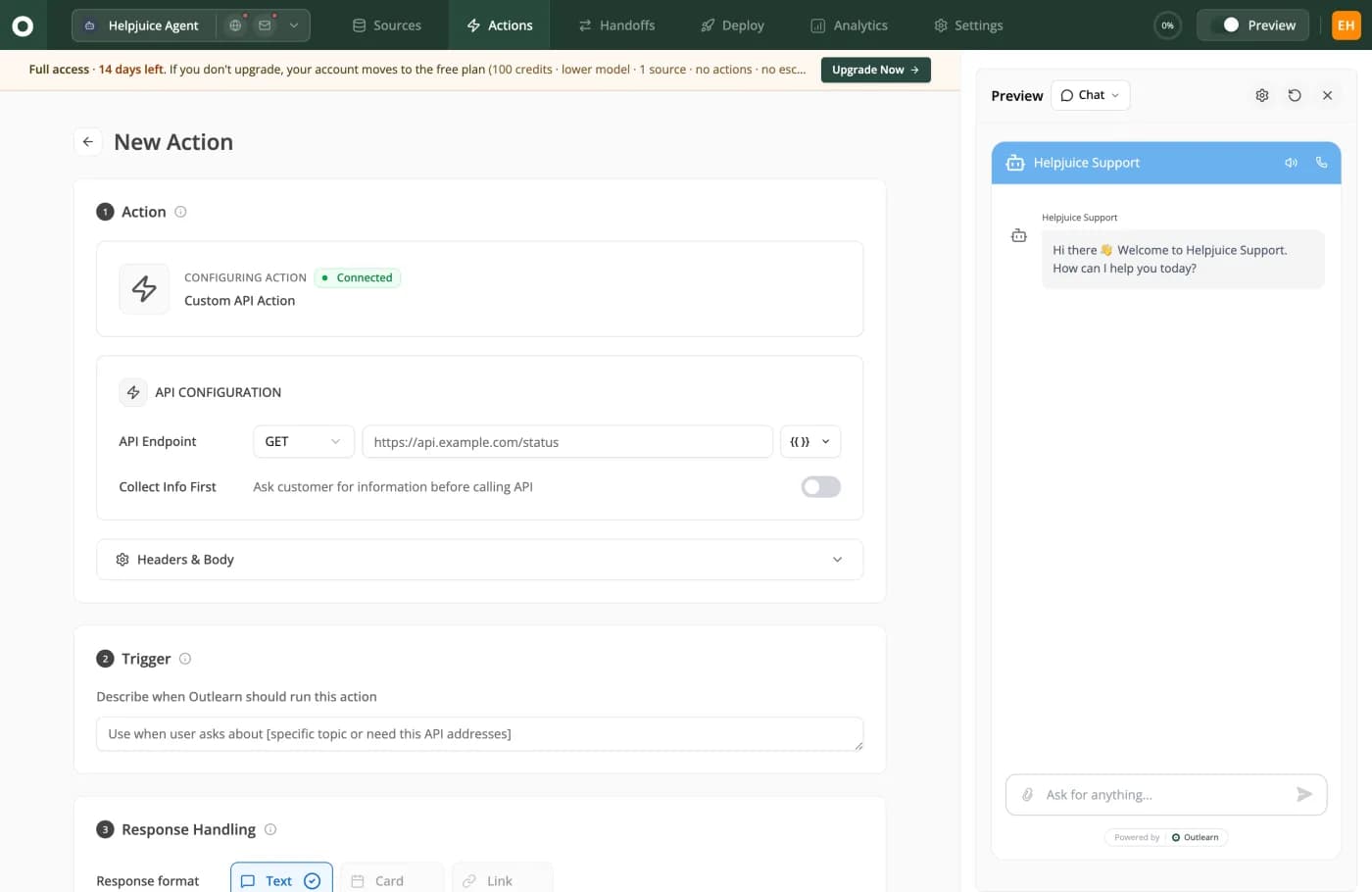
Week four in one screen. Step 1 is your endpoint and your own auth headers. Step 2 is a sentence, not a rules tree: "Describe when Outlearn should run this action." Step 3 decides how the result comes back. Nobody has to file a ticket with us to get an integration built.
PII, redaction, and what leaves your building
None of the four guides currently ranking for this term covers this, and it is the section that decides whether your customer service chatbot survives a security review. A support conversation is one of the densest concentrations of personal data your company handles: names, email addresses, order numbers, postal addresses, occasionally a card fragment somebody pasted despite being told not to.
Six decisions to make before launch
None of these has a universally right answer. All six have a wrong answer, which is leaving them undecided until the review.
| Data | Decision to make | The failure if you skip it |
|---|---|---|
| Customer name and email | Whether it is sent to the model at all, or held in your systems and referenced by an identifier. | Personal data ends up in a third-party inference log you did not audit. |
| Card numbers and credentials pasted by a customer | Detect and redact before storage, and before the model call. Never rely on telling customers not to. | You are now storing card data outside your payment scope. This is the one that becomes a real incident. |
| Order and account identifiers | Usually fine to send, but decide the retention period on transcripts explicitly. | Indefinite transcript retention is a default in more products than you would expect. |
| Conversation transcripts | How long they are kept, who can read them, and whether they train anything. | "Only our data" is a requirement buyers state in capitals. Get the answer in writing. |
| Internal documentation the agent can read | Which sources are public knowledge and which are internal, enforced per source. | Anything the agent can reach, a visitor can eventually talk it into repeating. |
| Data location | Which region processes and stores it, including the model provider's region. | A residency requirement discovered in week ten is a rebuild, not a setting. |
How Outlearn scopes it, and exactly where that stops
The mechanism against the fifth row is a per-source accessibility setting, visible on the source row in the screenshot above, plus per-end-user scoping so an anonymous visitor, a paying customer and an employee retrieve different things from the same customer service chatbot.
The limit is specific and we would rather write it here than let a table imply otherwise. User scoping works where we can read the source's user and group model, which today means your knowledge base. The cloud file connectors do not import users, so an answer drawn from a Drive folder is not scoped per person. The operational instruction that follows from that: put anything needing scoping in the knowledge base rather than in a shared folder.
One detail worth stealing whichever product you buy: accessibility should be a per-source control set on the row, not a global setting. Look again at the sources screenshot two sections above and the row carries its own Public or Internal switch. A source marked internal is not retrievable by an anonymous visitor, whatever they type at it.
GDPR, SOC 2 and HIPAA: the questions, and our own answers
Only one of the four guides ranking for this term touches compliance at all, and none of them tells you what to actually ask. Here is the short list, with the answers we can give about ourselves included, because a page that grades everyone else and stays quiet about itself is worth nothing.
Six questions to put in writing, and our own answers
Ask all six in email rather than on a call, because a written answer is the only kind your security team can act on. Two of the six run against us and are marked as such. And if your review turns up an actual security bug in Outlearn, report it through our bug bounty.
| Ask | What a good answer contains | Outlearn's answer |
|---|---|---|
| Send me your current audit report and its scope. | The report itself under NDA, its type, its date, and which systems are in scope. | Ask us. We are not making a certification claim in this guide, and you should treat any vendor's unevidenced badge the same way. |
| Do you support SAML or OIDC single sign-on? | A yes with the plan it is on, or a clear no. | Ask us, in writing, and hold the answer to the standard in the middle column. This page scores vendors on their published plan pages and does not grade its own author. |
| Where is data processed and stored, including by your model provider? | Named regions for both your infrastructure and every sub-processor. | Ask us for the current list. Do not accept a general answer from anyone here, including us. |
| Is my data used to train any model? | An unambiguous no, in the contract rather than in a blog post. | This belongs in your contract, not in a marketing page. Ask for it in writing. |
| Can you sign a data processing agreement and list sub-processors? | Yes, with a current sub-processor list you can subscribe to changes on. | Ask us. A vendor who cannot produce a sub-processor list has not thought about this. |
| Is customer data isolated per tenant, and how? | A specific architectural answer, not the word "secure". | Ask us for the architecture. Treat "enterprise-grade" from any vendor as a non-answer. |
Permissions and blast radius, in the order to grant them
Once your customer service chatbot can call your systems it stops being a documentation search and becomes software with credentials. The failure-mode section above has the practitioner's version of the arithmetic: every permission is another roll of the dice. The mitigation is not a clever guardrail, it is granting permissions in the order of what they can destroy.
Grant them in this order, never out of it
Let each stage run for at least two weeks before you add the next one. Nothing on this list is difficult. What goes wrong is granting stage four in week one because it demos well.
| Stage | Example actions | Worst realistic outcome | Control before granting |
|---|---|---|---|
| 1. Read documentation | Retrieve a help article or a policy page. | A wrong answer, embarrassing and reversible. | Per-source accessibility, and citations visible under every answer. |
| 2. Read customer records | Order status, subscription state, licence validity. | One customer sees another customer's data. | Identity verified from a signed token, never from a name the customer typed. |
| 3. Write low-value changes | Update a delivery address, resend a receipt, change a preference. | A wrong record that a person can fix in a minute. | Every call logged with who asked and what changed. |
| 4. Write money or entitlements | Issue a refund, cancel a plan, extend a trial. | Real money moved on a misread sentence. | A hard value cap and a review queue, not a confidence score. |
| 5. Passwords and account access | Reset a password, add a user, change an email. | Account takeover assisted by your own support agent. | Do not grant this. Practitioners are blunt about it and they are right. |
Two things to insist on at every stage
- Every action call is logged with the identity that triggered it and the parameters it ran with. An unlogged automated write is an incident you cannot investigate, only apologise for.
- Every action is reversible or capped. The alternative is trusting that a model never misreads a sentence, which is not a control, it is a hope.
In Outlearn an action is an HTTP call carrying your own auth headers, with a plain-English description of when to run it. That design puts the permission boundary where it belongs, in the credential you issue rather than in the model's judgement: give a customer service chatbot a read-only key and no amount of clever prompting turns it into a write.
Migrating off a chatbot you already have
Most readers of this guide are not starting from zero. They have a decision tree from 2022, or an intent classifier nobody has retrained in a year, or a retrieval agent pointed at an upload from last spring. Replacing a customer service chatbot is a different job from installing one, and the difference is that you already have assets you are attached to.
What transfers, and what has to be rebuilt
Less transfers than any vendor's migration page implies. The good news is that the thing which does transfer is the most valuable thing you have.
| What you have | Does it transfer? | What to do with it |
|---|---|---|
| Decision trees and flows | No. Nothing meaningful carries across. | Read them for the questions they cover, then throw them away. The tree was a workaround for not understanding language. |
| Intent training phrases | No, but they are valuable anyway. | They are the best list you will ever have of how customers phrase things. Use them as your test set. |
| Uploaded documents | Technically yes, and usually you should not. | Connect the original systems instead. Re-uploading last year's export recreates the staleness problem on day one. |
| Custom integrations and webhooks | Mostly, as plain HTTP calls. | Rebuild each as an action with its own scoped credential, in the blast-radius order above. |
| Conversation history | Rarely, and check whether you can export it at all. | Ask your current vendor now. At least one popular product's own documentation says an API export is the only route out. |
| The old bot's resolution rate | It is not comparable and you should not try. | Establish a new baseline by replaying real tickets, which is the next section. |
Run both at once, for a fortnight
The sequencing that avoids the worst outcome is boring. Keep the existing customer service chatbot answering while the new one answers the same questions in a preview or on a single low-stakes channel. Compare on your own traffic rather than on either vendor's demo content.
Nobody has ever regretted an overlap fortnight. Plenty of teams have regretted a cutover weekend, usually on the Monday. If you are moving off a specific product, we have written the arithmetic and the gaps for eight of them, starting from the comparison hub.
Test it on your own backlog, because demos lie
The most quoted piece of buying advice about an AI chatbot for customer service is two words long: demos lie. A vendor demo runs on content the vendor curated against questions the vendor chose. Here is the test that replaces it, and it takes about half a day.
The hundred-ticket replay
- Export your last 100 closed conversations, ordered by recency rather than cherry-picked. Include the ugly ones. Especially the ugly ones.
- Take only the customer's opening message from each, and send it to the trial agent as a new conversation.
- Grade each reply into three buckets: correct and complete, incomplete but not wrong, and wrong. Two people grading independently will disagree on about one in ten, which is itself useful information.
- Count the wrong ones twice. Once as a rate, and once by asking what each one would have cost if a real customer had believed it.
- Run the same 100 against the second vendor on your shortlist. The comparison between two products on your own traffic is worth more than every published resolution rate in this guide, including ours.
- Then test the ten hardest questions live, in conversation, with follow-ups. Single-turn accuracy and multi-turn accuracy are different numbers and the second one is the one your customers experience.
Your correct-and-complete rate from that exercise is your realistic resolution ceiling, before any tuning. If it lands between 40 and 60 percent you are in the same place as every practitioner who publishes honestly. If a vendor's own demo produces 90 and your backlog produces 45, the difference is content curation, not capability.
Ten questions for the demo call, and the answers that should worry you
Take these into the call in this order. The right-hand column is not a red flag on its own, it is a sign that the vendor has not thought about the thing, which is a different and slower problem.
| Ask | A good answer sounds like | An answer that should worry you |
|---|---|---|
| Show me an answer with its sources attached. | They click a citation chip and open the document it used. | "It searches your knowledge base", with nothing to click. |
| Ask it something my documentation does not cover. | It says it cannot find that, and offers a person. | It writes a fluent, plausible, invented answer. |
| What is the resolution rate, over how many conversations, and how is resolution defined? | A number, a denominator, a period, and a written definition. | "Up to" anything, or a case study instead of a definition. |
| Am I billed for a conversation the AI does not resolve? | A direct yes or no, and they know which without checking. | A description of the plan tiers. |
| What does one reply cost on the model I would actually run? | An arithmetic answer with the multiplier stated. | The headline per-unit rate for their cheapest model. |
| Which features in this plan can you remove later without my agreement? | A specific, narrow answer, or a contractual commitment. | Surprise at the question. Repricing complaints are the loudest in this category. |
| Does the preview run identical retrieval and identical models to production? | Yes, and they can explain why. | "The sandbox is for testing prompts." |
| What happens to a conversation the moment a human takes over? | Full transcript into the existing inbox, meter stops, thread reused. | A notification, a summary, or a new ticket. |
| List everything the agent can call, and what is logged when it does. | A list and a log format. | "It is fully secure." |
| Can I replay 100 of my own closed tickets before I buy? | Yes, and here is how to export them. | A curated demo environment instead. |
Four things to check that no scorecard has a row for
- Does the preview behave like production? Ask the same awkward question in both and compare. If they differ, every test you ran in the sandbox is void.
- Does it say it does not know? Ask something genuinely unanswerable. An agent that never says "I cannot find that" is an agent that will invent something eventually.
- Does escalation still work when the agent is confident and wrong? That is the case where a bot is least likely to offer a human, and where a customer most needs one.
- Does it answer the same question differently for two different customers? If you are selling to logged-in users on different plans, one correct answer is not enough.
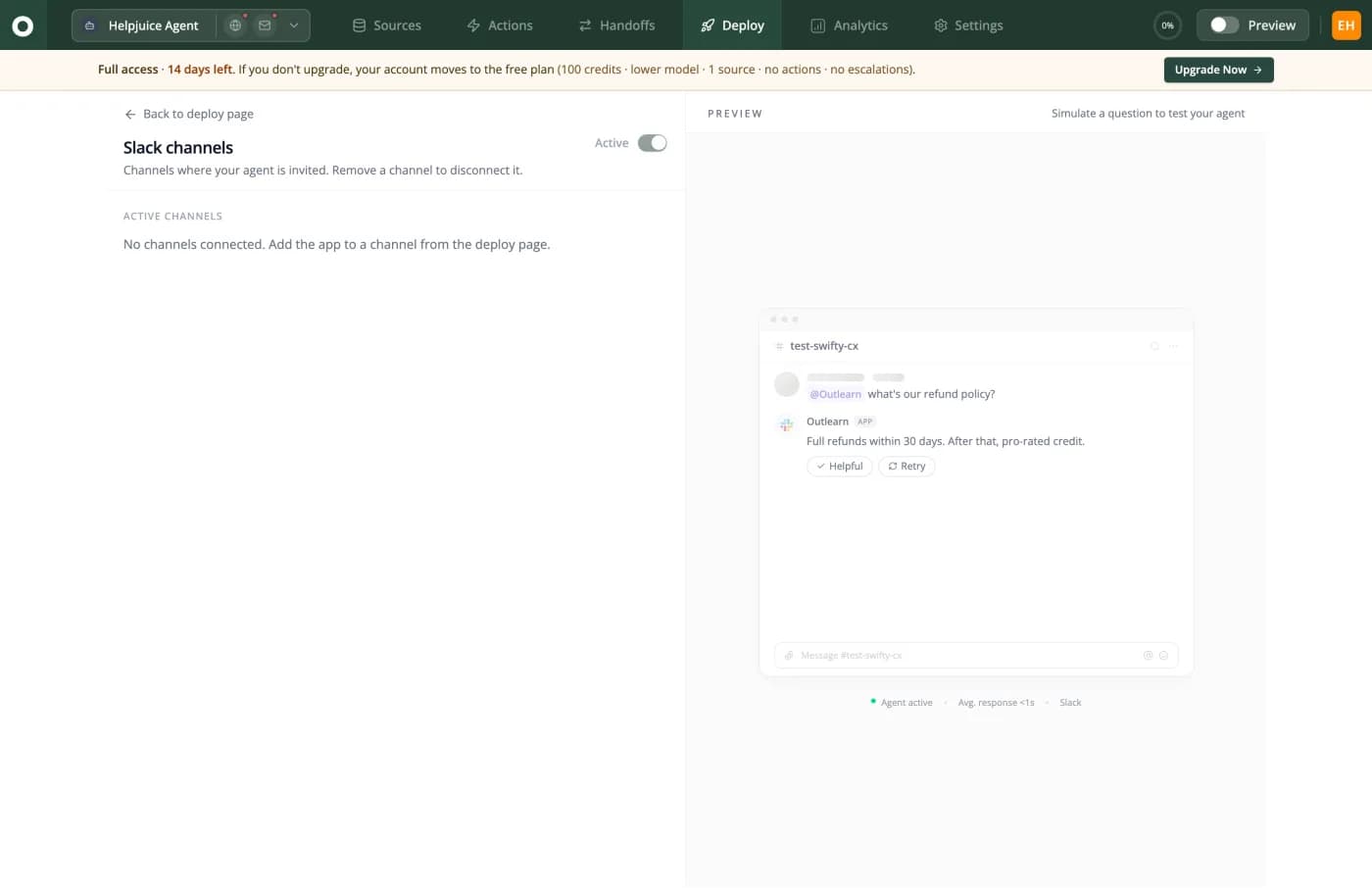
The same agent in Slack, answering an internal question about the refund policy. Two details worth stealing whichever product you buy: Helpful and Retry sit under the answer, so a wrong reply is one click from being reported and one click from being tried again. Most products make a bad answer a dead end.
What to measure in the first 90 days
One metric will be gamed, whether or not anybody means to. A pair of metrics with opposing failure modes will not. Report both from week one, so nobody has to renegotiate the definition later when the first number looks good.
Report a pair, never a single number
The left-hand number is the one your board wants. The right-hand number is the one that stops the left-hand number from being a lie. Publishing them together, from launch, removes the argument you would otherwise have in month three.
| Period | Primary number | Guardrail number | What a bad result looks like |
|---|---|---|---|
| Days 1 to 30 | Resolution rate on the launch segment only. | Escalation success: what share of "talk to a human" requests worked first time. | A high resolution rate and any escalation failures at all. Fix the second before celebrating the first. |
| Days 31 to 60 | Resolution rate across all launched channels. | Repeat-contact rate within seven days on AI-closed conversations. | Resolution up and repeat contact up together. That is abandonment, not deflection. |
| Days 61 to 90 | Cost per resolved conversation, computed from your real invoice. | Satisfaction on AI-closed conversations, reported separately from human-closed. | Cost per resolution rising as volume rises. That is the meter, not the agent. |
| Every month after | Share of total contacts the agent handled end to end. | The list of questions it got wrong, read by a person. | Nobody reading the wrong answers. That list is the whole improvement loop. |
The last row is the one that gets dropped and the one that matters most. Thirty minutes a week reading conversations the agent got wrong will improve your resolution rate more than any setting in any product, because almost every wrong answer resolves to one of three causes: a missing document, two documents that disagree, or a question that should always have reached a person.
Who owns what after launch
A customer service chatbot with no named owner degrades quietly, which is the worst way for software to fail. Four things need a name against them on the day you launch, and none of them is a full-time job.
| What | Who usually owns it well | Time per week | What happens if nobody owns it |
|---|---|---|---|
| The answers themselves | Whoever already owns the help centre, working from the wrong-answer list. | Around 30 minutes. | Accuracy decays about as fast as your product changes, and nothing alerts you. |
| Escalation rules and thresholds | A support lead, not an engineer. This is a policy decision. | Around 15 minutes. | Either the agent pushes through conversations it should hand over, or it hands over everything. |
| Action credentials and their scope | The engineer who issued the key, with a calendar reminder to rotate it. | Around 10 minutes. | Scope creeps upward one convenient exception at a time until nobody knows what it can do. |
| The monthly number and its guardrail | Whoever reports support metrics already. | Around 20 minutes. | The single flattering number becomes the official one, and the guardrail is quietly dropped. |
How this guide was made, and what it is missing
Every AI chatbot for customer service guide should carry this section and almost none do. Here is where each number came from, and what we could not get.
- Competitor prices were read from each vendor's own public pricing page and, where the page rendered prices in the browser, from the price data the page itself loads. All ten were read on 7 August 2026, and each row in the cost table names its source. Where a vendor does not publish a rate, they have no row.
- The cost per resolved conversation is computed at build time from the same pricing functions that power the interactive calculator on every comparison page on this site, so this page and those pages cannot disagree.
- Competitor page measurements, such as word counts, table counts and the absence of particular structured data, were taken from the pages themselves on 8 August 2026 using an automated reader that strips navigation, headers, footers and scripts before counting.
- Practitioner quotes come from public forum threads, linked in full below. We have quoted them as written, other than redacting one instance of profanity, and we have included criticism that applies to the category we sell into.
- Outlearn's own figures come from our codebase and our own telemetry rather than from our marketing site, which currently overstates several capabilities. Where our site and our code disagree, this guide follows the code.
What the pages currently ranking for this term leave out
We read the four guides holding the first page for "customer service chatbot" on 8 August 2026 and counted what they cover. This is not a criticism of the writing, which is mostly fine. It is a map of the gaps, and it is why this guide is shaped the way it is.
| Subtopic a buyer needs | How many of the four cover it | Where it is in this guide |
|---|---|---|
| An implementation timeline in weeks | None of the four. | Week by week, eight steps. |
| PII and redaction | None of the four. | Six decisions before launch. |
| Build versus buy | None of the four. | A four-column cost-of-ownership table. |
| Open source and self-hosting | None of the four. | The honest half of the build section. |
| A first-party number of their own | None of the four. | 50.4%, with the missing denominator named. |
| Cost normalised to one unit | None of the four. | Ten vendors at three volumes. |
| A published methodology | None of the four. | This section. |
| Any table at all | One of the four, which has 27. | Twenty of them, text in every cell. |
Two of those four pages are titled around how to create one, and none of them carries HowTo structured data. One is 266 days out of date with no visible update line. The most thorough of them, at 6,596 words with 27 tables, shows six FAQ questions to the reader and marks up none of them for a machine to read.
What is missing here, stated rather than hidden
- A denominator on our 50.4%. We publish the rate and not the sample. That is a real weakness in the strongest claim on this page.
- A handoff quality score. We score the published half, what the meter does at handoff, because we have not run all ten products in production and a score we invented would be worse than no score.
- Two vendors have no cost row. One publishes the unit and not the rate. One we could not price from published material.
- No video. The depth this guide aims for calls for a screen recording of the escalation path, and we have not shot it yet.
- No named human author. This is written by the Outlearn team. A named reviewer with a page behind them would be better and is not something to fake in the meantime.
If you find something wrong in here, tell us and we will fix it and say what changed in the update note at the top. That is the only claim on this page we can actually guarantee.
What support teams say when no vendor is listening
Buyers append "reddit" to almost every search in this category, which is a request rather than a habit: they assume the vendor page is not telling them the whole thing. So here are the threads, quoted as written and linked, including the ones that are unflattering to everything sold in this category. Every quote below is from a public thread, and the links go to the originals rather than to our summary of them.
“Deflection just doesn't work here. If they email you back five minutes later you didn't solve their problem. You just put them off. What we started tracking was First Contact Resolution. If the bot doesn't resolve it 100% it is a failure. Breaks your ego but reduces churn.”
“Most tools are designed to deflect vs resolve. You want something that can take action. If your bot can't look up a database or change a subscription it's just a fancy search bar. We won't use anything that can't process a refund by itself.”
“If your knowledge base is messy, AI won't magically fix it.”
“I literally tried that exact phrase. Not once, but over and over. I want to talk to a human. I want to talk to an advisor. The bot either ignored it, sent me back to another AI.”
“honesty and choice is important. Tell me that it's a bot answering the question, give me the option to speak to a human. I find it pretty shocking the number of times recently I've had to find weird and wonderful ways of talking to a human even after the bot has failed miserably. It's like trying to find an easter egg with some places.”
“if customers start using the AI assistant like a new form of search for their help docs, then it starts to get really expensive. You're not just replacing human conversations, you're offering instant answers to any question which could lead to a big jump in conversations.”
“I'm not going to sit here and say it's perfect. More work to be done. Support speed is also something we know we need to improve.”
“test a couple on your own ticket backlog, demos lie.”
“Deflection just doesn't work here. If they email you back five minutes later you didn't solve their problem. You just put them off. What we started tracking was First Contact Resolution. If the bot doesn't resolve it 100% it is a failure. Breaks your ego but reduces churn.”
“Most tools are designed to deflect vs resolve. You want something that can take action. If your bot can't look up a database or change a subscription it's just a fancy search bar. We won't use anything that can't process a refund by itself.”
“If your knowledge base is messy, AI won't magically fix it.”
“I literally tried that exact phrase. Not once, but over and over. I want to talk to a human. I want to talk to an advisor. The bot either ignored it, sent me back to another AI.”
“honesty and choice is important. Tell me that it's a bot answering the question, give me the option to speak to a human. I find it pretty shocking the number of times recently I've had to find weird and wonderful ways of talking to a human even after the bot has failed miserably. It's like trying to find an easter egg with some places.”
“if customers start using the AI assistant like a new form of search for their help docs, then it starts to get really expensive. You're not just replacing human conversations, you're offering instant answers to any question which could lead to a big jump in conversations.”
“I'm not going to sit here and say it's perfect. More work to be done. Support speed is also something we know we need to improve.”
“test a couple on your own ticket backlog, demos lie.”
We link out instead of paraphrasing, because a quote you cannot check is worth nothing. The seventh one is a vendor employee conceding hallucination and support speed in a thread that was not going their way, which is more candid than most pages in this category manage, including some of ours.
Customer service chatbot questions, answered
What is a customer service chatbot?
A customer service chatbot is software that answers customer questions in a conversation, in chat, email or a messaging channel, instead of a person answering them.
The modern version retrieves the answer from your own documentation and systems before it writes anything, which is why the quality of a chatbot is mostly the quality of the documentation behind it. Older versions matched keywords to scripted replies, and the difference matters: one can answer a question nobody anticipated, the other cannot.
How much does a customer service chatbot cost?
Between $0.12 and $2.07 per resolved conversation, which is a 17.3x spread for the same outcome.
We computed that from ten vendors' own published pricing pages on 2026-08-07, at 1,000 resolved conversations a month on a ten-person team. Headline plan prices are close to useless for comparing, because one vendor charges per seat, one per resolution, one per ticket whether it resolved anything or not, and one charges two meters for the same conversation. Normalise everything to cost per resolved conversation before you compare.
What percentage of tickets can an AI chatbot for customer service actually resolve?
Every practitioner who publishes a number from their own deployment lands between 40 and 62 percent.
Every vendor claim lands between 67 and 93. Outlearn's own telemetry reports a 50.4% self-solve rate, which sits inside the practitioner band rather than above it. Treat any number over 70 percent as a claim that needs a definition of resolution attached, and ask specifically whether a conversation the customer abandoned counts as resolved.
What is the difference between deflection rate and resolution rate?
Deflection counts conversations that did not reach a human.
Resolution counts conversations where the customer's problem was actually solved. The gap between them is customers who gave up. A support team on Reddit put it better than any vendor page has: that is not deflection, that is abandonment dressed up in a metric. Ask for resolution paired with a repeat-contact rate over the following seven days, because the two together cannot be gamed by a bot that hides the contact button.
When is a customer service chatbot the wrong answer?
When the answer is not written down anywhere, when the question is emotional rather than informational, when getting it wrong is expensive and irreversible, when your volume is low enough that a person answering in ten minutes is genuinely better, and when your documentation contradicts itself. A chatbot pointed at contradictory documentation will confidently pick one of the contradictions. Fix the documentation first, and if you cannot, do not deploy.
Will a customer service chatbot make things up?
It can, and the interesting question is what happens when it does not know.
Look for three things: whether answers are constrained to your own sources rather than the model's general knowledge, whether the answer shows which documents it read so anyone can check it, and whether the agent will say it does not know and hand over instead of guessing. A chatbot that invents a return policy has invented a commitment your company may be held to.
How does a customer reach a human, and can the bot hide the button?
It can, and plenty do.
This is the single most viscerally described failure in every public support forum: customers typing "I want to talk to a human" repeatedly and being routed back to the bot. Test it as the first sentence you ever send your own agent, before you evaluate anything else, and check that the handoff carries the full transcript so the person does not start from zero. Also check what your bill does at that moment, because several meters charge you for the failed conversation anyway.
Can a customer service chatbot do things, or only answer questions?
The good ones call your systems mid-conversation: look up an order, check a subscription, verify a licence.
A chatbot that cannot read your database is, in one practitioner's phrase, a fancy search bar. In Outlearn an action is an HTTP call with your own auth headers and a plain-English description of when to run it, so the agent decides at runtime rather than following a rules tree somebody has to maintain.
Do I need to clean up my knowledge base first?
Partly, and less than you think in volume terms.
The consistent production failure is not too little documentation, it is contradictory documentation: one team fed three years of history to an agent, watched it get worse, and ended up deleting the lot and starting again. Twenty current, non-contradictory answers to your twenty most common questions beat two thousand pages of drift. Structure matters too, because retrieval leans on headings.
Can I just build a customer service chatbot myself?
Yes, and the first version takes a competent engineer a weekend.
The cost is not the build, it is the connectors that keep breaking, the permission model, the escalation path into your inbox, the evaluation harness that tells you whether last week's change made answers worse, and the person who owns all of that in eighteen months. Several teams in public forums have tried, and the ones who are happy are the ones who scoped it to a single narrow job.
What is the best AI chatbot for customer service?
There is no single best one, and any page that names one without stating its scoring rubric is either guessing or selling.
The useful version of the question is which meter suits your volume and which one reads the systems your answers already live in. On cost per resolved conversation at 1,000 a month, the credit-metered products come out cheapest and the per-outcome products dearest, with a spread of roughly seventeen times. On knowledge coverage, most read a copy you upload rather than the original. Score the field on those two axes with your own numbers and the shortlist becomes short quickly.
Is an AI chatbot for customer service worth it for a small team?
Below roughly thirty conversations a week, probably not.
The setup work is the same as for a large team and the payback is much smaller, and a person replying within ten minutes is a genuinely better experience than a good bot. Between thirty and a few hundred a week it starts to pay, and the deciding factor is usually whether your top twenty questions have one clear written answer each. Note also that plan floors and seat minimums dominate the bill at low volume, so shop on the floor rather than on the per-unit rate.
What does Outlearn deliberately not do?
Outlearn is not a helpdesk: there is no agent inbox, and no WhatsApp or Instagram support today, so you still need somewhere for humans to answer.
For security-review specifics such as single sign-on, put the question to us in writing before you buy and we will answer the specific question, which is the standard this guide tells you to hold every vendor to.
How long does it take to launch a customer service chatbot?
Answering your first real question takes an afternoon.
Being live to all of your customers takes four to twelve weeks, and the variable is almost never the software. It is documentation cleanup, integration access, permissions and the security review. Plan the security review in week one rather than week ten and the same project finishes in a month instead of a quarter.
Run the hundred-ticket replay against your own documentation
Connect the systems your answers already live in, put last month's real questions to it, and read the resolution rate on your own traffic rather than ours. Free tier, no card, and nobody from sales calls you. The free tier does not include escalations, so plan the trial around that.
Sources
Every competitor fact in this guide comes from that competitor's own public page, with the date we read it. Vendor pricing was read on 7 August 2026 and page measurements on 8 August 2026. Practitioner quotes link to the original public threads.
- Help Scout pricing and AI Answers FAQ · checked 7 August 2026
- Chatbase pricing · checked 7 August 2026
- Chatbase data sources documentation · checked 6 August 2026
- Intercom pricing, including the Fin per-outcome offer · checked 7 August 2026
- Tidio pricing and the Lyro conversation ladder · checked 7 August 2026
- Zoho Desk pricing · checked 7 August 2026
- LiveChat pricing · checked 7 August 2026
- ChatBot.com pricing and resolution packs · checked 7 August 2026
- Gorgias pricing and its two meters · checked 7 August 2026
- Front pricing and the Autopilot add-on · checked 7 August 2026
- Helply pricing · checked 7 August 2026
- Zendesk AI agents and resolution billing · checked 8 August 2026
- IBM on AI customer service chatbots · checked 8 August 2026
- Salesforce on customer service chatbots · checked 8 August 2026
- NiCE on what a customer service chatbot is · checked 8 August 2026
- Botpress on customer service chatbots · checked 8 August 2026
- Crisp on chatbots for customer service · checked 8 August 2026
- ChatBot.com on customer service chatbots · checked 8 August 2026
- Chatbase on AI agents for customer experience · checked 8 August 2026
- Zendesk on AI knowledge bases · checked 8 August 2026
- Outlearn pricing · checked 9 August 2026
- Deflection versus resolution, argued by practitioners · checked 8 August 2026
- A team's four-month results across 12 properties and 5 languages · checked 8 August 2026
- Practitioners asking for numbers that are not vendor numbers · checked 8 August 2026
- The per-resolution incentive argument · checked 8 August 2026
- An AI ticketing tool closing tickets it did not solve · checked 8 August 2026
- Permissions as a blast radius · checked 8 August 2026
- Whether AI is useful in helpdesk software yet · checked 8 August 2026
- A customer asking repeatedly for a human · checked 8 August 2026
- The consumer side of a bad deployment · checked 8 August 2026
- A chatbot spreading a false return policy · checked 8 August 2026
- Only our tickets, and nobody else's · checked 8 August 2026
- Building this with open-source components instead of buying it · checked 8 August 2026
- Unpredictable pricing named as the first objection · checked 8 August 2026
- The success-tax argument, two years earlier · checked 8 August 2026
- A vendor employee on hallucination and support speed · checked 8 August 2026
- Retrieval structure over content volume · checked 8 August 2026
Keep reading
Customer service chatbot
The product this guide evaluates the whole field against: Outlearn's customer service chatbot, on the homepage.
Compare every tool side by side
Eight comparisons with the pricing arithmetic worked through, and an interactive calculator on each one.
Set up a live handoff to a human
The shipped setup guide for escalating an Outlearn conversation into LiveChat, transcript included.
What one resolved conversation costs us
Our own plans, credits and per-reply meter, including the parts that are worse than the competition.
What teams use this for
The jobs an agent takes on first, and the ones that should still reach a person.